One of things I strongly believe in is using the right technology for solving the right problem. You can often find (understandably) that IT professionals look for solutions using technologies they understand best which can lead to inappropriate decsions being taken. "When all you have is a hammer....".
However, just how do you define the right technology?
An analogy. Whats the best way of buying music? Is it online or in HMV (other retail outlets are available)? Now, for price and convenience then online is pretty tough to beat. But what if you don't have a computer or don't know how to use one? There may be a premium associated with buying in the high street but its still the best understood method there is - everyone knows how to buy from a shop.
I've been involved with a particular application written entirely on SQL Server technologies and its an impressive implementation. Its fast and reliable and for someone familiar with the technology entirely supportable. However, its not me that has to use it. The "customer" has limited technology skills and yet is tasked with driving the application with recurring difficulty and as a consequence, there is a feeling that the application is not robust. The fact is, that the application is entirely robust, but is not built for a technology-light person to use.
Previous to the SQL implementation, there was an Excel equivalent which was less robust and performant. However, the users fully understood how to work it and were much more comfortable with it even at the cost of longer runtime. Asked to use its Excel predecessor, I would have probably claimed it not robust as a result of not being comfortable using that technology. Same issue, different technology.
We need to make the right technology choices and this doesn't just mean what is the best technology for the job. First and foremost, applications need to be fit for purpose and usable by the customer even if thats at the expense of the most elegant technology solution. If customers have no experience or understanding of a particular technology, then we shouldn't be building solutions that require that skillset. Simple.
Showing posts with label Excel. Show all posts
Monday, 16 January 2012
What is the RIGHT technology?
Labels:
applications,
Design,
Excel,
problem solving,
ramble,
SQL Server,
support,
technology
Thursday, 16 June 2011
T-SQL: Excel 2007 & OPENROWSET
I do a lot of work with Excel spreadsheets and often need to import data from them on an adhoc basis. I typically use the Import/Export wizard to do this, although depending on how i'm feeling and the requirement I may go with one of the functions which gets data from a remote source such as OPENROWSET.
On this occasion, I was working with an Excel 2007 (.xlsx) workbook so I went straight to my favourite search engine to get a site which would remind myself of the syntax i'd need (how the internet makes one lazy on remembering syntax!) and it didn't disappoint. The first thing I noticed was that this wasn't using the old trusty Jet driver that I would use when working with Excel 2003. Using the Jet provider gives a fairly unhelpful:
Instead, you need to use the Access Database Engine driver:
So we're all set to get that data. Or so I thought as on executing the query, I got an error:
The errors here are a bit of a red herring as the directory in question is open to Everyone. Also, it says that it is unable to get the column information but strangely, the column set was returned (albeit empty) in the results tab. Odd.
This problem can be averted by simply running the following queries to set some OLEDB properties:
NB: a simple gotcha is remember to have your spreadsheet closed when trying to access it using this method otherwise you'll get another access denied error.
A couple of things I noticed but was unable to reproduce on a consistent basis, is that after running these queries, the excel spreadsheets appear to become corrupt for a length of time. Also, the changes did not always appear to be instant and on my machine it sometimes took 10 minutes for the behaviour to change.
On this occasion, I was working with an Excel 2007 (.xlsx) workbook so I went straight to my favourite search engine to get a site which would remind myself of the syntax i'd need (how the internet makes one lazy on remembering syntax!) and it didn't disappoint. The first thing I noticed was that this wasn't using the old trusty Jet driver that I would use when working with Excel 2003. Using the Jet provider gives a fairly unhelpful:
OLE DB provider "Microsoft.Jet.OLEDB.4.0"FOR linked server "(null)" returned message "Unspecified error"
Msg 7303, Level 16, State 1, Line 1
Cannot initialize the data source object of OLE DB provider "Microsoft.Jet.OLEDB.4.0" for linked server "(null)"
Instead, you need to use the Access Database Engine driver:
SELECT *
FROM OPENROWSET('Microsoft.ACE.OLEDB.12.0','Excel 12.0;Database=C:\ExcelImport\MyData.xlsx', 'SELECT * FROM [Sheet1$]')
So we're all set to get that data. Or so I thought as on executing the query, I got an error:
Msg 7399, Level 16, State 1, Line 2
The OLE DB provider "Microsoft.ACE.OLEDB.12.0" for linked server "(null)" reported an error. Access denied.
Msg 7350, Level 16, State 2, Line 2
Cannot get the column information from OLE DB provider "Microsoft.ACE.OLEDB.12.0" for linked server "(null)".The errors here are a bit of a red herring as the directory in question is open to Everyone. Also, it says that it is unable to get the column information but strangely, the column set was returned (albeit empty) in the results tab. Odd.
This problem can be averted by simply running the following queries to set some OLEDB properties:
USE [master]
GO
EXEC dbo.sp_MSset_oledb_prop N'Microsoft.ACE.OLEDB.12.0', N'AllowInProcess', 1
GO
EXEC dbo.sp_MSset_oledb_prop N'Microsoft.ACE.OLEDB.12.0', N'DynamicParameters', 1
GO
NB: a simple gotcha is remember to have your spreadsheet closed when trying to access it using this method otherwise you'll get another access denied error.
A couple of things I noticed but was unable to reproduce on a consistent basis, is that after running these queries, the excel spreadsheets appear to become corrupt for a length of time. Also, the changes did not always appear to be instant and on my machine it sometimes took 10 minutes for the behaviour to change.
Labels:
Excel,
OPENROWSWET,
SQL,
SQL 2008,
SQL Server,
T-SQL
Friday, 13 May 2011
SSIS: Excel Source Causes NULLs
I've come across a strange issue using SQL2008 recently trying to import data from an Excel datasource. Essentially, i was using the Unpivot task in order to import some legacy time series data to a SQL table. Some of the data in the columns was incomplete for the oldest dates so some cells were blank early on and this is where the problems came. Essentially, for those columns with "leading" blanks, I was getting no data at all for any of the dates once it had been unpivotted. Using the dataviewer I was able to establish that the problem was with the Excel Source component.
Hopefully, the screenshots will show the issue:
Excel Source
Note here how there are leading blanks in 2 of the columns.

SSIS Package
Nothing fancy in this package. Just a simple task to unpivot that data into a normalised table.

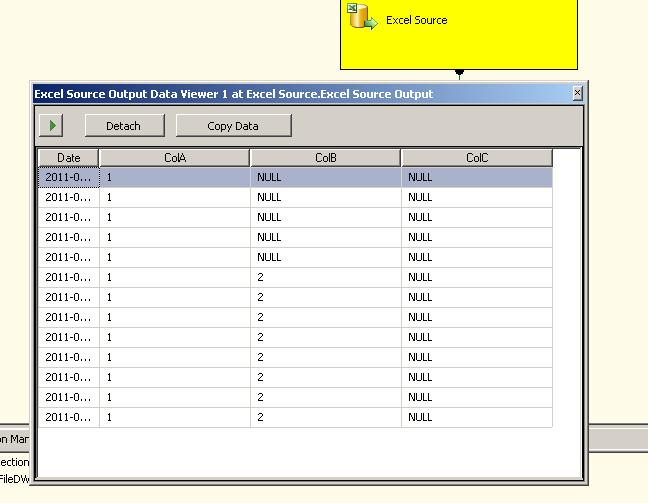
Datagrid View
But look what happens when we run it. The Datagrid View shows us that the 3s in ColC have been replaced by NULLs. This will have ramifications for the data as these will not be imported into the database.

So why has this happened? The key is with the behaviour of the Excel driver. Essentially, it will guess the datatypes of the values in the columns based upon what is in the first 8 rows. If it there is a conversion error then the value will be exposed as a NULL and this is exactly what is happening in this example. The values in ColB are unaffected as there are values in the sampled 8 rows whereas ColB has blanks for the first 8 rows and it assumes that anything after this will be Text.
You can read about the behaviour here where it tells you of the workaround which is to:
"add IMEX=1 to the value of Extended Properties in the connection string of the Excel connection manager in the Properties window"
Example:
Provider=Microsoft.Jet.OLEDB.4.0;Data Source=C:\SSIS\TestExcelSource.xls;Extended Properties="EXCEL 8.0;HDR=YES";
Hopefully, the screenshots will show the issue:
Excel Source
Note here how there are leading blanks in 2 of the columns.
SSIS Package
Nothing fancy in this package. Just a simple task to unpivot that data into a normalised table.
Datagrid View
But look what happens when we run it. The Datagrid View shows us that the 3s in ColC have been replaced by NULLs. This will have ramifications for the data as these will not be imported into the database.
So why has this happened? The key is with the behaviour of the Excel driver. Essentially, it will guess the datatypes of the values in the columns based upon what is in the first 8 rows. If it there is a conversion error then the value will be exposed as a NULL and this is exactly what is happening in this example. The values in ColB are unaffected as there are values in the sampled 8 rows whereas ColB has blanks for the first 8 rows and it assumes that anything after this will be Text.
You can read about the behaviour here where it tells you of the workaround which is to:
"add IMEX=1 to the value of Extended Properties in the connection string of the Excel connection manager in the Properties window"
Example:
Provider=Microsoft.Jet.OLEDB.4.0;Data Source=C:\SSIS\TestExcelSource.xls;Extended Properties="EXCEL 8.0;HDR=YES";
Labels:
Data Source,
Excel,
SQL,
SQL 2008,
SQL Server,
SSIS
Subscribe to:
Posts (Atom)