Showing posts with label T-SQL. Show all posts

Monday, 17 September 2012

T-SQL: Allow low privileged user to Truncate table

The problem with TRUNCATE is that it is a DDL statement rather than the regulation DELETE statement which is DML. As such, its not captured by using the db_datewriter database role and so on the face of it, you're left with two options:

1) Add the user to db_ddladmin role (or db_owner)
2) Grant ALTER table permissions to the table(s) in question

I'm not really a fan of either of these approaches as the first gives far too much control to the user and I try to avoid giving object level permissions if possible.

An alternative is to make use of the EXECUTE AS clause and wrap your TRUNCATE statement within a stored procedure and grant permissions on that instead.

-- create a test database 
CREATE DATABASE TruncateTest
GO

USE TruncateTest
GO

-- create a low privilege user to test with
CREATE USER NoRights WITHOUT LOGIN
GO

-- create a table to test against
CREATE TABLE dbo.TestData (Id INT IDENTITY(1,1))
GO
-- add some dummy data
INSERT INTO dbo.TestData DEFAULT VALUES
GO 20
-- check the data is ok
SELECT COUNT(*) FROM dbo.TestData
GO

-- impersonate the test user
EXECUTE AS USER = 'NoRights'
GO
-- try to issue the truncate command
TRUNCATE TABLE dbo.TestData
GO

Msg 1088, LEVEL 16, State 7, Line 1
Cannot find the object "TestData" because it does not exist or you do not have permissions.
-- switch back to my superuser
REVERT
GO

-- create a wrapper procedure to truncate the table
CREATE PROCEDURE dbo.TruncateTestData
AS
TRUNCATE TABLE
dbo.TestData
GO

-- grant execute to the test user
GRANT EXECUTE ON dbo.TruncateTestData TO NoRights
GO

-- impersonate the test user
EXECUTE AS USER = 'NoRights'
GO
-- execute the procedure
EXEC dbo.TruncateTestData
GO

Msg 1088, Level 16, State 7, Procedure TruncateTestData, Line 4
Cannot find the object "TestData" because it does not exist or you do not have permissions.
-- switch back to my superuser
REVERT
GO

-- modify the procedure to execute in the context of the owner (dbo)
ALTER PROCEDURE dbo.TruncateTestData
WITH EXECUTE AS OWNER
AS
TRUNCATE TABLE
dbo.TestData
GO

-- impersonate the test user
EXECUTE AS USER = 'NoRights'
GO
-- execute the procedure
EXEC dbo.TruncateTestData
GO

-- switch back to the superuser
REVERT
GO

-- check the data
SELECT COUNT(*) FROM dbo.TestData
GO

-- tidy up
DROP DATABASE TruncateTest
GO

Thursday, 26 July 2012

SSMS: Help prevent the "oh ****" moment

Its funny how sometimes you think of something which would be great idea and then the solution falls into your lap. This very thing happened to me the other day after an "oh ****" moment when I executed a query on a production server rather than the test server. Unfortunately, there weren't any fail safes in place (eg restricted privileges) so the query ran successfully and promptly updated a stack of live data. Fortunately, the database in question was not being used and so there was no impact on users but this could so easily have not been the case.

I'm sure I haven't been the only one bitten by this, and it occurred to me that this is far too easy to do. When in fire-fighting mode it can often be the case that I'm flicking between windows with many connection windows open at one time and even the most diligent person can get caught out running a query on the wrong database. When its just a SELECT statement or you issue a query that is in the wrong database thats no big deal but if its a DML (or worse a DDL!!) statement then things can get pretty ugly quickly.

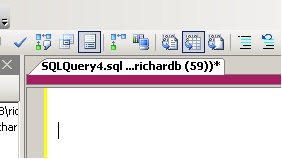
What would have been really helpful for me was an obvious indicator showing which server I was on - probably a different coloured query window (red for Prod please!!) for each database server. And then, on my daily trawl through my twitter timeline I came across this tweet:

I won't go into details of all the cool tools that are mentioned in the post, but the SSMS Tools Pack has (amongst other things) functionality that replicates what I was hoping for. You can essentially configure a colour strip for a database server which is a simple visual aid to help you recognise when you in "the danger zone". 

Even better than this is the fact that you can configure a template for a New Query connection which I tweaked to try and remind the user to be aware of the colour. This means that every time I hit the New Query button the query opens with the text to remind the user to check the server with arrows pointing to the colour bar.


This obviously isn't a full proof solution and is no substitute for having more stringent measures in place to prevent issues such as issuing a delete statement on a production server in error. However, it is simple and effective and is another tool you can have in your armoury to help prevent downtime or dataloss. Every little helps!

Tuesday, 1 May 2012

T-SQL: Change Schema of User Defined Type

I've been working with one of our developers to try and rationalise some database objects into some sensible schemas using the ALTER SCHEMA syntax:

http://msdn.microsoft.com/en-us/library/ms173423.aspx

Just out of interest, is it me or is this syntax for changing an objects schema a bit strange? Are you altering the Schema or the Object? Anyhow, I digress...

In our example, we have several User Defined Types which require transfer. Here is some sample code illustrating the problem:

CREATE SCHEMA NewSchema
GO

CREATE SCHEMA OldSchema
GO

CREATE TYPE OldSchema.MyUDT FROM VARCHAR(20);
GO
ALTER SCHEMA NewSchema TRANSFER OldSchema.MyUDT
GO


This gives the rather unhelpful error:

Cannot find the object 'MyUDT', because it does not exist or you do not have permission.

I checked the documentation and there isn't anything that suggests types should be treated any differently so I was stumped. Fortunately, I managed to unearth this post which provides a workaround to the problem.

ALTER SCHEMA NewSchema TRANSFER type::OldSchema.MyUDT
GO


I'm not sure why this is not documented in Books Online (or at least nowhere I can see). One to keep an eye out for.

Wednesday, 15 February 2012

T-SQL: Get Last Day of Month

One of my early blog posts highlighted how to get the first day of the current month. Well, another common task is get to the last day of a month and i'm (reasonably) pleased to see that SQL Server 2012 has an inbuilt function to achieve this.

In versions previous to SQL2012, this problem can be solved by running the following:

DECLARE @InputDate DATE = GETDATE() 

SELECT DATEADD(D, -1, DATEADD(M,DATEDIFF(M,0,@InputDate)+1,0))


However, we can now just use the inbuilt function EOMONTH which should make coding easier to read.

DECLARE @InputDate DATE = GETDATE()

SELECT EOMONTH(@InputDate)


-- 2012-02-29 


You can also specify an offset to the function which will allow you to look at months x number of months from your inputdate which I can certainly see being useful.

DECLARE @InputDate DATE = GETDATE()

SELECT EOMONTH(@InputDate, 4)


-- 2012-06-30

Note how the return type is a DATE and not a DATETIME.  Interestingly, Books Online suggests that the return type is "start_date or datetime2(7) although my tests suggest it always returns DATE.

Thursday, 9 February 2012

T-SQL: INSERT with XML shredding is very slow

Back in 2010, I came across a performance bug with SQL2008 SP1. When shredding XML using the nodes query, the performance is fine with a SELECT but when you want to INSERT the data to a table/temptable/tablevariable the performance becomes very poor.

The query I was having problems with was something like this (Thanks for the sample data wBob!):

DECLARE @xml XML;
-- Spin up some test data 
WITH cte AS 
( 
SELECT 65 x 
UNION ALL 
SELECT x + 1 
FROM cte 
WHERE x < 90 ) 

SELECT @xml = (
    
SELECT CHAR( a.x ) +
' & co.' AS "name"
    a.x
AS "value"
    
'FIELD' AS "paramdata/field"

    FROM cte a 
      CROSS JOIN cte b 
      CROSS JOIN cte c
    
FOR XML PATH('root'), TYPE
    
) 


DECLARE @ConfigData TABLE (ID INT, Name NVARCHAR(255), Value NVARCHAR(255), ParamData XML)

INSERT INTO @ConfigData (ID, Name , Value, ParamData) 
SELECT 1,
    
tbl.cols.value('name[1]', 'varchar(1000)'),
    
tbl.cols.value('value[1]', 'varchar(1000)'),
    
tbl.cols.query('./paramdata[1]')

FROM @XML.nodes('//root') AS tbl(cols) 
GO

I raised this with MS via Connect (#562092) and went on to implement my own workaround using the following CLR shredding function:

public partial class UserDefinedFunctions
{
    [SqlFunction(FillRowMethodName = "tvf_clr_FillParameterData",
        TableDefinition = "Name nvarchar(255), Value nvarchar(255), ParamData nvarchar(255)")]
    
public static IEnumerable tvf_clr_ParameterDataShredder(SqlXml parameterData)
    
{
        XmlDocument document
= new XmlDocument();
        
document.LoadXml(parameterData.Value);
        
return document.SelectNodes("//parameter");
    
}

    
public static void tvf_clr_FillParameterData(object row, out string outName, out string outValue, out string outParamData)
    
{
        XmlNode document
= (XmlNode)row;

        
outName = document.SelectSingleNode("name").InnerXml;
        
outValue = document.SelectSingleNode("value").InnerXml;

        
outParamData = null;
        
if (document.SelectSingleNode("paramdata") != null)
            
outParamData = document.SelectSingleNode("paramdata").OuterXml;
    
}
}
;

 
This served me well and solved the performance issue and all was fine. Until now.

The thing is, this method doesn't handle decoding of escape characters in XML, so any &s that exist in the XML string being shredded will be returned as &:amp. Not ideal. My first thought was to just implement a decoding function within the CLR routine but the main candidates use System.Web which is not available within SQL Server. I eventually stumbled upon this post from Jonathan Keyahias which provided a sql safe Encoding implementation and I was going to use this as a basis for writing my own decoding function. While waiting the 20mins for Visual Studio 2008 to open, it occured to me to revisit the Connect case and fortunately, there were a number of workarounds there, and a combination of the solutions the most effective.

INSERT INTO @ConfigData (ID, Name , Value, ParamData)
SELECT     1,
    
tbl.cols.value('(name/text())[1]', 'nvarchar(255)'),
    
tbl.cols.value('(value/text())[1]', 'nvarchar(255)'),
    
tbl.cols.query('./paramdata[1]') 

FROM @xml.nodes('//root') AS tbl(cols) 
OPTION ( OPTIMIZE FOR ( @xml = NULL ) )

The above simple modification to my SQL INSERT statement and performance was acceptable and more importantly, the decoding of the escaped characters was fine. Saved me a lot of work.

Thursday, 2 February 2012

T-SQL: SQL2012 Code Snippets

I've never really bought into the idea of object templates in SQL Server Management Studio and in my experience, not many other database professionals have either!

Just recently however, I've been getting a increasingly frustrated at the non-standard development pattern of database objects and (just as importantly) the lack of documentation for procedures and functions. I've written in the past about using Extended Properties to help version your database and this could easily be extended to document objects too. However, in a previous role I picked up quite a nice habit of adding documentation headers to each procedure and function which gives some basic information to anyone looking at the procedure to give them a headstart in debugging/understanding. A heading may look like this:


/*
created by: Richard Brown
date created: 02/02/2012
description: this procedure just returns information about customers
debug:
   declare @custid = 1
   exec dbo.getcustomers @custid

*/


Encouraging developers to do this in practice is a real problem and this is where code snippets can come in. There are numerous default snippets available in SQL2012 management studio and you can access them by hitting CTRL-K, CTRL-X and the tabbing to the appropriate snippet:


Here you can see there are already a few default stored procedure snippets including a "create a simple stored procedure" snippet. You can create/add new snippets as you see fit but for my purposes, I want to just modify the existing snippets so they include my header as default.

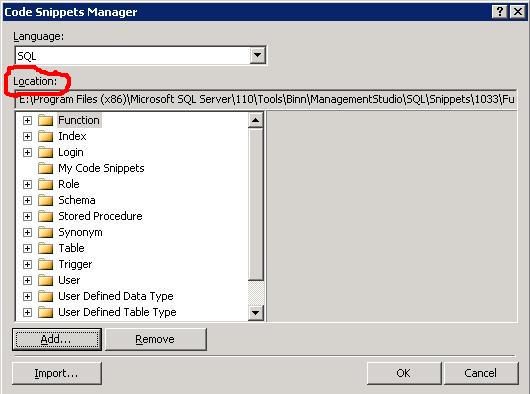
Take a note of the location of the snippets by navigating to Tools/Code Snippets Manager:


You can then find the .snippet file and make the appropriate modifications. Its just an xml file and for my needs I just needed to make the following change:

<Code Language="SQL">
            <![CDATA[
/* 
created by: 
date created:
description:
debug:

*/
CREATE PROCEDURE $SchemaName$.$storedprocname$ 
    @$Param1$ $datatype1$ = $DefValue1$,
    @$Param2$ $datatype2$ 
AS
    SELECT @$Param1$,@$Param2$ 
RETURN 0 $end$]]>
        </Code> 


When I hit the snippet function, I now get the updated template for my stored procedure. Hoepfully, this will encourage the devs to follow the standards.

Tuesday, 31 January 2012

Admin: Bulkadmin vs ADMINISTER BULK OPERATIONS

I had an application thrust upon me recently which required the user executing it to have permissions to use the BULK INSERT command in T-SQL. I was aware of the server role bulkadmin which would have been a nice sledgehammer approach to crack this nut, but I was hoping for something a little more refined. Unfortunately, the only thing I came up with was the ADMINISTER BULK OPERATIONS command which would grant this privilege without having the server role membership but I was curious as to what the difference between the 2 was.

As far as I can tell, there is no difference between the 2 operations and both seem to achieve the same thing. From this I assume that bulkadmin is just a wrapper around the ADMINISTER feature although I'd be interested in knowing (as I couldn't find out) if there are other permissions the server role gives you.

Lets look at the example (running on SQL2008 SP2)

-- create some test logins
CREATE LOGIN [DOMAIN\user1] FROM WINDOWS
GO

CREATE LOGIN [DOMAIN\user2] FROM WINDOWS
GO

-- lets impersonate a user
EXECUTE AS LOGIN = 'BARRHIBB\user1'
GO
-- and check the server permissions 
SELECT * FROM sys.server_permissions
GO

SELECT * FROM fn_my_permissions(NULL,'SERVER')
GO 
-- does the user have bulk op permissions? 
SELECT has_perms_by_name(NULL, NULL, 'ADMINISTER BULK OPERATIONS');
GO


-- lets go back to being a superuser 
REVERT
GO

USE MASTER
GO
-- how about if we just grant administer bulk operations to the user? 
GRANT ADMINISTER BULK OPERATIONS TO [DOMAIN\user1]
GO

-- lets impersonate that user
EXECUTE AS LOGIN = 'DOMAIN\user1' 
GO 
-- and check the server permissions
SELECT * FROM sys.server_permissions
GO

SELECT * FROM fn_my_permissions(NULL,'SERVER')
GO
-- does the user have bulk op permissions?
SELECT has_perms_by_name(NULL, NULL, 'ADMINISTER BULK OPERATIONS'); 
GO


-- can the user grant other users to be bulky people? 
GRANT ADMINISTER BULK OPERATIONS TO [DOMAIN\user2]
GO


Msg 4613, Level 16, State 1, Line 2
Grantor does not have GRANT permission.


So lets see what happens with the server role:

REVERT
-- remove the users permissions 
REVOKE ADMINISTER BULK OPERATIONS TO [DOMAIN\user1]
GO
 

-- now add the user to the bulk admin role and check permissions again
EXEC MASTER..sp_addsrvrolemember @loginame = N'DOMAIN\user1', @rolename = N'bulkadmin'
GO
 -- lets impersonate that user
EXECUTE AS LOGIN = 'DOMAIN\user1' 
GO 
-- and check the server permissions 
SELECT * FROM sys.server_permissions
GO

SELECT * FROM fn_my_permissions(NULL,'SERVER') 
GO
-- does the user have bulk op permissions?
SELECT has_perms_by_name(NULL, NULL, 'ADMINISTER BULK OPERATIONS'); 
GO


NB: The main difference here is that the permission has not been explicitly granted but it is an effective permission.

-- perhaps with the server role the user grant other users to be bulky people? 
GRANT ADMINISTER BULK OPERATIONS TO [DOMAIN\user2]
GO


Msg 4613, Level 16, State 1, Line 2
Grantor does not have GRANT permission.


So it seems that the bulkadmin server role doesn't offer any "admin" from a security point of view which begs the question, just why would you add a user to this role rather than just explicity grant them the permission through the GRANT statement (or vice versa)?

Friday, 20 January 2012

T-SQL: Find missing gaps in data

I recently had solve a problem of finding missing values in a data series and at the same time, came across this article on the new Analytic Functions in SQL2012.

It turns out that there is a new function which can simplify my solution although as the problem is on a SQL2008 database, I won't be able to implement it. Still, another piece of the jigsaw.

Here, I'll present queries for each version:

USE TempDB
GO


-- setup the table 
CREATE TABLE [dbo].[HoleyTable](
  
[Date] [datetime] NOT NULL,
  
[Country] [char](3) NOT NULL,
  
[Val] [decimal](22, 10) NULL
)
ON [PRIMARY]
GO


 -- and some sample data
INSERT INTO dbo.HoleyTable (Date, Country, Val) VALUES ('20100131','GBP', 40) 
INSERT INTO dbo.HoleyTable (Date, Country, Val) VALUES ('20100331','GBP', 30) 
INSERT INTO dbo.HoleyTable (Date, Country, Val) VALUES ('20100531','GBP', 20)
INSERT INTO dbo.HoleyTable (Date, Country, Val) VALUES ('20101031','GBP', 50) 
INSERT INTO dbo.HoleyTable (Date, Country, Val) VALUES ('20101231','GBP', 55) 
INSERT INTO dbo.HoleyTable (Date, Country, Val) VALUES ('20100228','USD', 20)
INSERT INTO dbo.HoleyTable (Date, Country, Val) VALUES ('20100331','USD', 10)
INSERT INTO dbo.HoleyTable (Date, Country, Val) VALUES ('20100430','USD', 15) 
INSERT INTO dbo.HoleyTable (Date, Country, Val) VALUES ('20100630','USD', 25)
INSERT INTO dbo.HoleyTable (Date, Country, Val) VALUES ('20100731','USD', 55) 
INSERT INTO dbo.HoleyTable (Date, Country, Val) VALUES ('20101130','USD', 30) 
GO 

-- SQL2008
WITH RankedData 
AS
( 
SELECT *, ROW_NUMBER() OVER (PARTITION BY Country ORDER BY Date) AS rn 
FROM dbo.HoleyTable 
) 
SELECT a.Country,
  
b.Date AS StartOfGap,
  
a.Date AS EndOfGap,
  
DATEDIFF(m, b.date, a.date)-1 AS missingdatapoints 

FROM RankedData a
  
INNER JOIN RankedData b
      
ON a.rn = b.rn + 1
          
AND a.Country = b.Country 

WHERE DATEDIFF(m, b.date, a.date) > 1; 
GO

-- SQL2012
WITH PeekAtData  
AS
(
SELECT *,
      
curr = date,
      
nxt = LEAD(Date, 1, NULL) OVER (PARTITION BY Country ORDER BY date)FROM dbo.HoleyTable 

)
SELECT Country,
     
curr AS StartOfGap,
      
nxt AS EndOfGap,
  
DATEDIFF(m, curr, nxt) -1 AS MissingDatapoints 

FROM PeekAtData p
WHERE DATEDIFF(m, curr, nxt) > 1
GO


--tidy up
DROP TABLE dbo.HoleyTable
GO


And how about the all important question of performance? Well, here is a screenshot of the execution plans for the 2 queries where you can see the 2012 implementation does outperform its 2008 counterpart by a ratio of about 3:1.


Thursday, 1 December 2011

T-SQL: Audit Data Changes

I was recently asked about how to implement auditing of data changes for a database. I know SQL Server contains the Change Data Capture feature but (as is often the case with things I want!), its an Enterprise only feature meaning its out of the reach for the application in question.

As it happened, it turned out that there was already an application in-house (that I hadn't developed) which implemented its own auditing of changes based around a simple Audit table and Triggers. I'm still yet to find out who wrote it, but it certainly does the trick. The database it runs on is relatively static so I do have reservations how scalable it is but for some tables you want control over, it may be suitable.

CREATE TABLE [dbo].[Audit](
  
[AuditID] [int] IDENTITY(1,1) NOT NULL,
  
[Type] [char](1) NULL,
  
[TableName] [varchar](128) NULL,
  
[PrimaryKeyField] [varchar](1000) NULL,
  
[PrimaryKeyValue] [varchar](1000) NULL,
  
[FieldName] [varchar](128) NULL,
  
[OldValue] [varchar](1000) NULL,
  
[NewValue] [varchar](1000) NULL,
  
[UpdateDate] [datetime] NULL,
  
[UserName] [varchar](128) NULL
)
ON [PRIMARY]

GO
 

ALTER TABLE [dbo].[Audit]  
ADD  CONSTRAINT [DF_Audit_UpdateDate] DEFAULT (GETDATE()) FOR [UpdateDate]
ALTER TABLE [dbo].[Audit] 
ADD  CONSTRAINT [DF_Audit_UserName] DEFAULT (SUSER_SNAME()) FOR [UserName]
GO

CREATE TRIGGER dbo.MyTableChangeTracking
ON dbo.MyTable 
FOR INSERT, UPDATE, DELETE
AS

DECLARE
@bit INT
DECLARE
@field INT
DECLARE
@maxfield INT
DECLARE
@char INT
DECLARE
@fieldname VARCHAR(128) 

DECLARE @TableName VARCHAR(128) = 'MyTable';
DECLARE @PKCols VARCHAR(1000)
DECLARE @sql VARCHAR(2000) 
DECLARE @UserName VARCHAR(128) = SUSER_SNAME() 
DECLARE @Type CHAR(1) 
DECLARE @PKFieldSelect VARCHAR(1000)
DECLARE @PKValueSelect VARCHAR(1000)

-- Action 
IF EXISTS (SELECT TOP 1 * FROM inserted)
BEGIN
   IF
EXISTS (SELECT TOP 1 * FROM deleted)
      
SET @Type = 'U' -- update
  
ELSE
       SET
@Type = 'I' -- insert 

END
ELSE
   SET
@Type = 'D' -- delete

-- get all the changed values (need both tables for update)
 

SELECT * INTO #ins FROM inserted 
SELECT * INTO #del FROM deleted 

-- Get primary key columns for full outer join 
SELECT @PKCols = COALESCE(@PKCols + ' AND', ' ON') + ' i.' + c.COLUMN_NAME + ' = d.' + c.COLUMN_NAME 
FROM INFORMATION_SCHEMA.TABLE_CONSTRAINTS pk
  
INNER JOIN INFORMATION_SCHEMA.KEY_COLUMN_USAGE c
      
ON c.TABLE_NAME = pk.TABLE_NAME
          
AND c.CONSTRAINT_NAME = pk.CONSTRAINT_NAME 

WHERE pk.TABLE_NAME = @TableName
  
AND CONSTRAINT_TYPE = 'PRIMARY KEY' 


-- Get primary key fields select for insert 
SELECT @PKFieldSelect = COALESCE(@PKFieldSelect + '+', '') + '''' + COLUMN_NAME + '''' 
FROM INFORMATION_SCHEMA.TABLE_CONSTRAINTS pk
  
INNER JOIN INFORMATION_SCHEMA.KEY_COLUMN_USAGE c
      
ON c.TABLE_NAME = pk.TABLE_NAME
          
AND c.CONSTRAINT_NAME = pk.CONSTRAINT_NAME 

WHERE pk.TABLE_NAME = @TableName
  
AND CONSTRAINT_TYPE = 'PRIMARY KEY' 


SELECT @PKValueSelect = COALESCE(@PKValueSelect + '+', '') + 'convert(varchar(100), coalesce(i.' + COLUMN_NAME + ',d.' + COLUMN_NAME + '))'
FROM INFORMATION_SCHEMA.TABLE_CONSTRAINTS pk
  
INNER JOIN INFORMATION_SCHEMA.KEY_COLUMN_USAGE c
      
ON c.TABLE_NAME = pk.TABLE_NAME
          
AND c.CONSTRAINT_NAME = pk.CONSTRAINT_NAME 

WHERE pk.TABLE_NAME = @TableName
  
AND CONSTRAINT_TYPE = 'PRIMARY KEY' 


-- raise an error if there is no Primary Key 
IF @PKCols IS NULL 
BEGIN
   RAISERROR
('no PK on table %s', 16, -1, @TableName)
  
RETURN
END

SELECT
@field = 0,
  
@maxfield = MAX(ORDINAL_POSITION)  

FROM INFORMATION_SCHEMA.COLUMNS
WHERE TABLE_NAME = @TableName 

-- now loop through the fields to log the values from each field
WHILE @field < @maxfield 
BEGIN
   SELECT
@field = MIN(ORDINAL_POSITION)
  
FROM INFORMATION_SCHEMA.COLUMNS
  
WHERE TABLE_NAME = @TableName AND ORDINAL_POSITION > @field
  
  
SELECT @bit = (@field - 1 )% 8 + 1
  
SELECT @bit = POWER(2,@bit - 1)
  
SELECT @char = ((@field - 1) / 8) + 1
  
  
IF SUBSTRING(COLUMNS_UPDATED(),@char, 1) &amp; @bit > 0 OR @Type IN ('I','D')
  
BEGIN
       SELECT
@fieldname = COLUMN_NAME
      
FROM INFORMATION_SCHEMA.COLUMNS
      
WHERE TABLE_NAME = @TableName
          
AND ORDINAL_POSITION = @field
      
      
-- dynamically build and execute the audit insert statement
      
SELECT @sql = 'INSERT INTO dbo.Audit (Type, TableName, PrimaryKeyField, PrimaryKeyValue, FieldName, OldValue, NewValue)'
      
SELECT @sql = @sql + ' SELECT ''' + @Type + ''''
      
SELECT @sql = @sql + ',''' + @TableName + ''''
      
SELECT @sql = @sql + ',' + @PKFieldSelect
      
SELECT @sql = @sql + ',' + @PKValueSelect
      
SELECT @sql = @sql + ',''' + @fieldname + ''''
      
SELECT @sql = @sql + ',CONVERT(VARCHAR(1000),d.' + @fieldname + ')'
      
SELECT @sql = @sql + ',CONVERT(VARCHAR(1000),i.'  + @fieldname + ')'
      
SELECT @sql = @sql + ' FROM #ins i FULL OUTER JOIN #del d'
      
SELECT @sql = @sql + @PKCols
      
SELECT @sql = @sql + ' WHERE i.' + @fieldname + ' <> d.' + @fieldname
      
SELECT @sql = @sql + ' OR (i.' + @fieldname + ' IS NULL AND d.' + @fieldname + ' IS NOT NULL)'
      
SELECT @sql = @sql + ' OR (i.' + @fieldname + ' IS NOT NULL AND d.' + @fieldname + ' IS NULL)'

      
EXEC (@sql)
  
END
END

GO


Its quite a complicated trigger and took some time to get my head round but it certainly does the trick and you just need to implement this for each table you wish to track changes on. The data is readable too:


But i wasn't comfortable with the overhead of the trigger, the dynamic sql nor the fact that I hadn't written it myself! So I considered a second approach, still using triggers but this time just dumping the changed records to an audit table in XML format. This would have the advantage of a much simpler trigger even at the cost of readability of results and potentially higher storage costs.


CREATE TABLE dbo.tblAudit(
  
AuditID INT NOT NULL IDENTITY(1,1),
  
TableName VARCHAR(255),
  
DataInserted XML,
  
DataDeleted XML,
  
DateCreated DATETIME,
  
CreatedBy VARCHAR(2000)
)
 

GO 

CREATE TRIGGER dbo.MyTable_ChangeTracking 
ON dbo.MyTable 
FOR INSERT, UPDATE, DELETE
AS

SET NOCOUNT ON
-- set the tablename

DECLARE @TableName VARCHAR(255) = 'dbo.MyTable'-- grab the changed data in XML format
DECLARE @InsertXML XML = (SELECT * FROM inserted FOR XML AUTO);
DECLARE @DeleteXML XML = (SELECT * FROM deleted FOR XML AUTO);-- log it 
INSERT INTO dbo.tblAudit (TableName, DataInserted, DataDeleted, DateCreated, CreatedBy) 
SELECT @TableName, @InsertXML, @DeleteXML, GETDATE(), SUSER_SNAME()
GO

To interogate the results, you'd need to be comfortable working with XML but the simplicity of the trigger is something i really like. Hopefully, you wouldn't need to be looking at this data too often so the ease of logging is the main factor when implementing something like this. You could easily deploy this across multiple tables/servers too with a simple Powershell script.

Now, I wouldn't recommend either of this in a highly transactional database and you would want to consider whether to implement this method if the performance of your DML statements was critical and your storage quite tight. I'm going to experiment a bit with the CDC to see just what benefits it gives over a bespoke implementation (I suspect its much more lightweight) while also hoping that the feature gets downgraded to the lower editions of SQL Server.
/* add this crazy stuff in so i can use syntax highlighter