Showing posts with label SQL2012. Show all posts

Wednesday, 15 February 2012

T-SQL: Get Last Day of Month

One of my early blog posts highlighted how to get the first day of the current month. Well, another common task is get to the last day of a month and i'm (reasonably) pleased to see that SQL Server 2012 has an inbuilt function to achieve this.

In versions previous to SQL2012, this problem can be solved by running the following:

DECLARE @InputDate DATE = GETDATE() 

SELECT DATEADD(D, -1, DATEADD(M,DATEDIFF(M,0,@InputDate)+1,0))


However, we can now just use the inbuilt function EOMONTH which should make coding easier to read.

DECLARE @InputDate DATE = GETDATE()

SELECT EOMONTH(@InputDate)


-- 2012-02-29 


You can also specify an offset to the function which will allow you to look at months x number of months from your inputdate which I can certainly see being useful.

DECLARE @InputDate DATE = GETDATE()

SELECT EOMONTH(@InputDate, 4)


-- 2012-06-30

Note how the return type is a DATE and not a DATETIME.  Interestingly, Books Online suggests that the return type is "start_date or datetime2(7) although my tests suggest it always returns DATE.

Thursday, 2 February 2012

T-SQL: SQL2012 Code Snippets

I've never really bought into the idea of object templates in SQL Server Management Studio and in my experience, not many other database professionals have either!

Just recently however, I've been getting a increasingly frustrated at the non-standard development pattern of database objects and (just as importantly) the lack of documentation for procedures and functions. I've written in the past about using Extended Properties to help version your database and this could easily be extended to document objects too. However, in a previous role I picked up quite a nice habit of adding documentation headers to each procedure and function which gives some basic information to anyone looking at the procedure to give them a headstart in debugging/understanding. A heading may look like this:


/*
created by: Richard Brown
date created: 02/02/2012
description: this procedure just returns information about customers
debug:
   declare @custid = 1
   exec dbo.getcustomers @custid

*/


Encouraging developers to do this in practice is a real problem and this is where code snippets can come in. There are numerous default snippets available in SQL2012 management studio and you can access them by hitting CTRL-K, CTRL-X and the tabbing to the appropriate snippet:


Here you can see there are already a few default stored procedure snippets including a "create a simple stored procedure" snippet. You can create/add new snippets as you see fit but for my purposes, I want to just modify the existing snippets so they include my header as default.

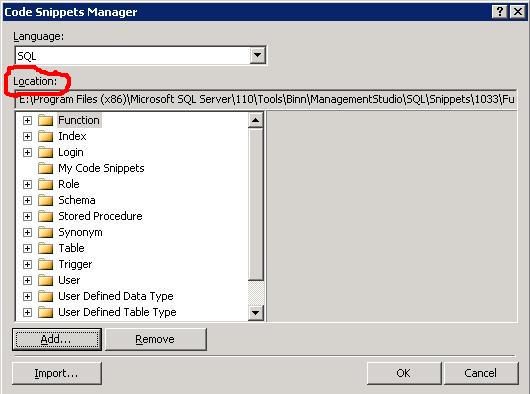
Take a note of the location of the snippets by navigating to Tools/Code Snippets Manager:


You can then find the .snippet file and make the appropriate modifications. Its just an xml file and for my needs I just needed to make the following change:

<Code Language="SQL">
            <![CDATA[
/* 
created by: 
date created:
description:
debug:

*/
CREATE PROCEDURE $SchemaName$.$storedprocname$ 
    @$Param1$ $datatype1$ = $DefValue1$,
    @$Param2$ $datatype2$ 
AS
    SELECT @$Param1$,@$Param2$ 
RETURN 0 $end$]]>
        </Code> 


When I hit the snippet function, I now get the updated template for my stored procedure. Hoepfully, this will encourage the devs to follow the standards.


Friday, 20 January 2012

T-SQL: Find missing gaps in data

I recently had solve a problem of finding missing values in a data series and at the same time, came across this article on the new Analytic Functions in SQL2012.

It turns out that there is a new function which can simplify my solution although as the problem is on a SQL2008 database, I won't be able to implement it. Still, another piece of the jigsaw.

Here, I'll present queries for each version:

USE TempDB
GO


-- setup the table 
CREATE TABLE [dbo].[HoleyTable](
  
[Date] [datetime] NOT NULL,
  
[Country] [char](3) NOT NULL,
  
[Val] [decimal](22, 10) NULL
)
ON [PRIMARY]
GO


 -- and some sample data
INSERT INTO dbo.HoleyTable (Date, Country, Val) VALUES ('20100131','GBP', 40) 
INSERT INTO dbo.HoleyTable (Date, Country, Val) VALUES ('20100331','GBP', 30) 
INSERT INTO dbo.HoleyTable (Date, Country, Val) VALUES ('20100531','GBP', 20)
INSERT INTO dbo.HoleyTable (Date, Country, Val) VALUES ('20101031','GBP', 50) 
INSERT INTO dbo.HoleyTable (Date, Country, Val) VALUES ('20101231','GBP', 55) 
INSERT INTO dbo.HoleyTable (Date, Country, Val) VALUES ('20100228','USD', 20)
INSERT INTO dbo.HoleyTable (Date, Country, Val) VALUES ('20100331','USD', 10)
INSERT INTO dbo.HoleyTable (Date, Country, Val) VALUES ('20100430','USD', 15) 
INSERT INTO dbo.HoleyTable (Date, Country, Val) VALUES ('20100630','USD', 25)
INSERT INTO dbo.HoleyTable (Date, Country, Val) VALUES ('20100731','USD', 55) 
INSERT INTO dbo.HoleyTable (Date, Country, Val) VALUES ('20101130','USD', 30) 
GO 

-- SQL2008
WITH RankedData 
AS
( 
SELECT *, ROW_NUMBER() OVER (PARTITION BY Country ORDER BY Date) AS rn 
FROM dbo.HoleyTable 
) 
SELECT a.Country,
  
b.Date AS StartOfGap,
  
a.Date AS EndOfGap,
  
DATEDIFF(m, b.date, a.date)-1 AS missingdatapoints 

FROM RankedData a
  
INNER JOIN RankedData b
      
ON a.rn = b.rn + 1
          
AND a.Country = b.Country 

WHERE DATEDIFF(m, b.date, a.date) > 1; 
GO

-- SQL2012
WITH PeekAtData  
AS
(
SELECT *,
      
curr = date,
      
nxt = LEAD(Date, 1, NULL) OVER (PARTITION BY Country ORDER BY date)FROM dbo.HoleyTable 

)
SELECT Country,
     
curr AS StartOfGap,
      
nxt AS EndOfGap,
  
DATEDIFF(m, curr, nxt) -1 AS MissingDatapoints 

FROM PeekAtData p
WHERE DATEDIFF(m, curr, nxt) > 1
GO


--tidy up
DROP TABLE dbo.HoleyTable
GO


And how about the all important question of performance? Well, here is a screenshot of the execution plans for the 2 queries where you can see the 2012 implementation does outperform its 2008 counterpart by a ratio of about 3:1.


/* add this crazy stuff in so i can use syntax highlighter