Showing posts with label Visual Studio. Show all posts

Wednesday, 25 January 2012

Visual Studio: Change default browser


When debugging web apps in Visual Studio, the browser it throws up is typically your default browser. Makes sense I guess. However, once you have many browsers on your machine you may wish to change this.

This is the scenario I cam up against the other day and thanks to this article, I managed to do find a way.

Essentially, you need to right click on an ASP.NET (.aspx) page in your project, right click and select "Browse With..." and change the default browser.


NB: if you are developing an MVC with Razor, I found you had to just add an .aspx file to the project to achieve this goal then remove it.

Thursday, 13 October 2011

Denali SSIS: Loop through a list of servers

Its been tough to get any time recently to play with Denali, so I thought i'd put together a quick tutorial on SSIS using Denali to give people a tiny flavour of what it looks like. I intend (time permitting) to use this tutorial in the future to extend the package to show off a few of the new features of Denali.

Note: this task can be achieved in previous versions of SSIS with minimal changes.

The aim of this package is a simple one: to iterate over a list of Servers and execute a SQL task against each one. I've also thrown in a Script task too for good measure.

Setup

First up, we'll set up the test data in Management Studio (look at that cool Denali syntax colouring!):


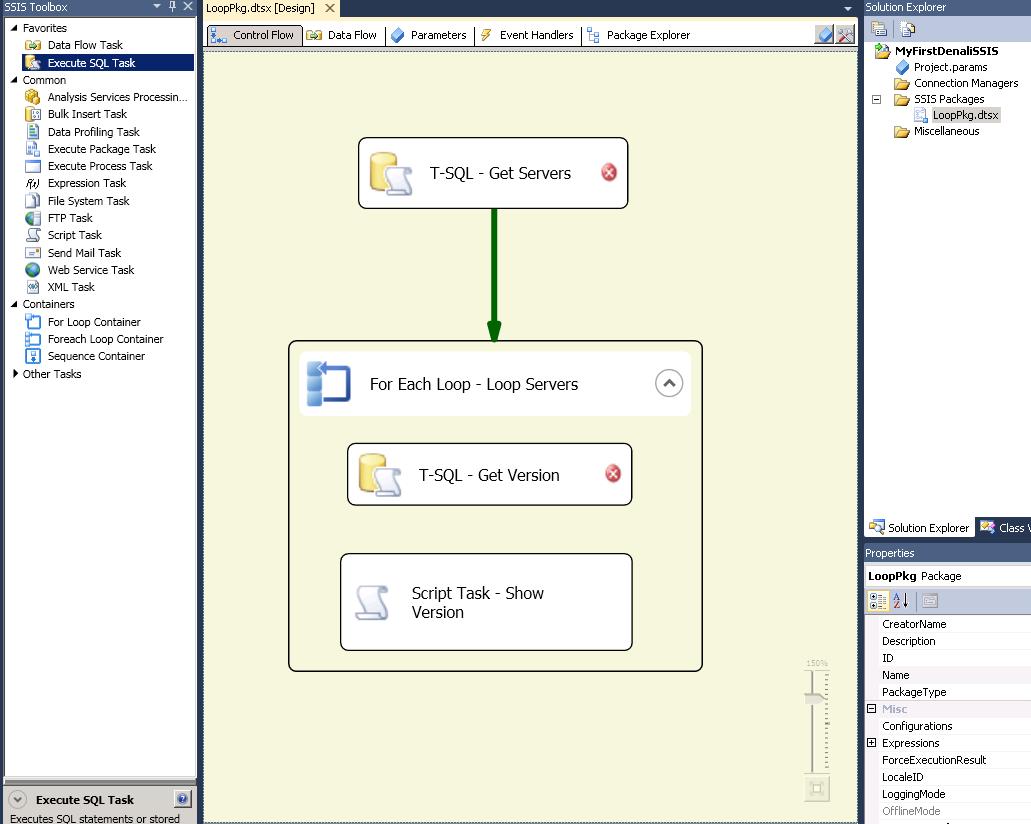
Then we move into Visual Studio to start our package:

Although I've not configured the Tasks yet, you can immediately get a feel for what the purpose of this package is going to be. As you might expect, there is improved "kerb appeal" from MS in this release with smoother graphics and features such as the magnifier which allow you to make your design more readable.


Configuration

1) T-SQL - Get Servers:

The Execute T-SQL dialog box is straight forward enough to configure. The main thing to note on the General tab is that you need to set the ResultSet appropriately to Full result set.


 On the Result Set tab, you need to set your Result to a variable of type Object. If you haven't already created your variable, you can create one from this dialog box.


2) For Each Loop - Servers

We just need to choose the Foreach ADO Enumerator and select the object source variable to be that you populated in the previous task. Simple.


Click onto the Variable Mappings and here is where you'll pull out the relevant details from your object. In our case, we just need to grab the ServerName and populate a simple string variable to use in the tasks within the container. You need to map these variables by Zero based Index and we're only interested in the first column, hence Index 0.


3) T-SQL - Get Version

Another T-SQL task here, but the clever part is that we need the connection to be dynamic. In other words, for each server in our collection, we need to connect to that server and get its version.

First, we add an extra connection using the Connection Manager (Note, I also change my connection name to show that its dynamic - i've called it DynamicSQLConn)


We can make the connection dynamic by changing the ConnectionString property on each iteration of the loop. To do this, we dive into the Properties window and click on Expressions:


We just then set the ConnectionString property to something like the following:

"Data Source=" + @[User::ServerName]  + ";Initial Catalog=master;Provider=SQLNCLI11.1;Integrated Security=SSPI;Auto Translate=False;"


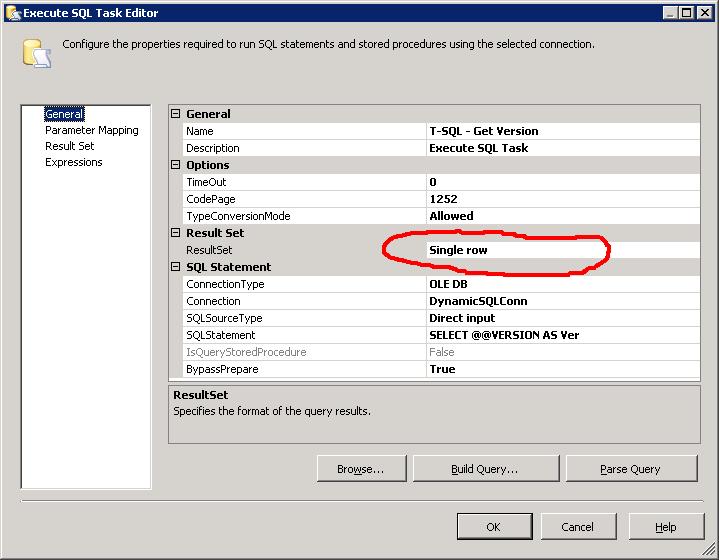
Now we can just use this connection string in our T-SQL task. I've chosen to return the results of @@VERSION. Its a single column, single row result set so i've chosen the Single Row result set.


Now we just need to configure the Result Set by sending the output to another string variable


4) Script Task - Show Version

Now typically, you'd want to do something more appropriate than just showing your results via a Message Box but this is exactly what i'm going to do. If nothing else, it illustrates the use of the Script Task.

We just open up the task and we need to pass in the variables we wish to use. You can type them in, or just use the select dialog box thats provided. As we're only displaying, they just need to be ReadOnlyVariables.


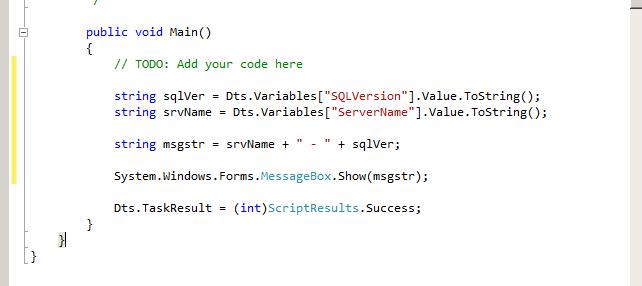
When you click Edit Script, you get a new instance of Visual Studio open up to add your code. We only need to modify the Main method:


And thats it!!

Execution

You can test and execute the package through Visual Studio and see even more of that "Kerb Appeal" that I talked about earlier. Gone are the garish colours associated with previous versions of SSIS and they've been replaced by more subtle and sexy icons:


Hopefully this has been helpful in giving a quick glance at the look and feel of Denali SSIS while also showing how you can SSIS to loop over a dataset.

Specifically the main points to take away are:
1) For Each Loop Container with an ADO Enumerator, using the Object variable and accessing properties of the object
2) T-SQL Task - using a dynamic connection with Expressions, using different Result Sets and populating variables from result sets
3) Script Task - passing in variables and writing a simple task.

Tuesday, 5 July 2011

Denali: SSMS has Improved look and feel

One of the first things I noticed with the new version of SQL Server (Denali) was the changes to Management Studio and the development experience. While not as ground breaking as the move from Query Analyzer to SSMS when SQL 2005 was released, there is definitely further movement towards a common development platform for programmers.

Here is the initial splash page you get when booting up SSMS:


The main thing I noted here was the comment in the bottom right corner which explicitly states "Powered by Visual Studio". To me, this is a clear indication of the direction MS is heading with its database toolset.

And here we have a shot of what using SSMS for development looks like:


Notice here how we have much more varied colour coding for keywords, specifically variables and object names. This is a vast improvement on the generic black text in previous versions. Another feature you can see here is the bottom left of the shot above the results pane - a zoom dropdown allowing you to quickly increase the size of the text in your query window. There is also one for the results pane, although this shot doesn't show it.

Development Environment Convergence

We've already seen Visual Studio creeping into the SQL Server arena with the Business Intelligence Development Studio (BIDS) which is essentially the VS shell with SQL Server plugged in and I can see MS trying to consolidate their development environments still further. This makes a lot of sense for software devs who will often be developing database enabled applications and need to flit between their .Net code and database code. Having a more uniform and familiar environment makes the experience that much smoother and hopefully more efficient.

Tuesday, 15 March 2011

SSIS: Watch List, where are you?

Something that i always forget when developing SSIS packages is how to use the watch list. Unfortunately, its not quite as simple as "right click" variable, "add to watch list".

It appears that you can only activate the watch list once you add some breakpoints to the packge and the package is debugging. In other words, you can't set this stuff up ahead of time. When you start debugging, the watch window shows in Visual Studio and you can drag the variables to this window.

Friday, 7 January 2011

SSIS: Can't link Tasks in Container?

I've just come across an issue whereby I have an existing For Each Loop container with a single dataflow task within. To develop the package further, I wanted to add an Execute T-SQL task within the container before the dataflow task so dragged over the task icon and configured it. However, when I tried to join the tasks with a precedence constraint, an error was thrown:

Cannot create connector. Cannot connect the executables from different containers.

This seemed a bit confusing as the tasks were definitely both within the container. However, a simple restart of Visual Studio 2008 solved the issue so this looks like a bug with the GUI.

Friday, 24 December 2010

SSIS: Precedence Constraint with XML

I was using an expression for a precedence constraint in a package recently and came across an issue where, although the expression was valid (and correct, honest!!) the package would not proceed.

Essentially, i was testing that a string variable which contained XML from an XML (XSLT) task was not blank/empty:

LEN(@[User::ErrorXML]) > 0
@[User::ErrorXML]) != ""

I can see the variable in the watch list as but neither of these expression options was working. I guess this is down to the fact that you can't execute these functions on XML but i think its a bit confusing. The variable is of type string, so no matter if the SSIS Task outputs XML, i would have thought its type would have been strongly bound to that whats set in the variable. This doesn't appear to be the case as I precedence constraints on other "standard" string variables evaluate successfully.

Just something to keep any eye out for.

Friday, 10 December 2010

SQL Database Project in Juneau!!

I've just watched the following video and it seems that MS are finally going to add a database project type to the default development environment.

http://www.msteched.com/2010/Europe/DAT314

Although there appear to be plenty of extra features which are impressive, just having the ability to store your database schema as a project is a massive step forward. Previously, this option was only available in Visual Studio Database Edition (aka datadude) and came at a fairly significant cost. I always thought that MS was selling DBAs/Database Developers a little short by not providing this out of the box in SSMS or BIDS but now it appears that they rectifying the situation.

It'll be interesting to see what this means for SSMS. Perhaps this will be streamlined to be more akin to the old Enterprise Manager and used as an Administration tool rather than the dev/admin hybrid that it currently exists as. Personally, although I have VS2008DE, i tend to do my development using SSMS and then really just use VS2008DE to manage the project from a source control perspective. Its certainly not ideal but SSMS is where i feel most comfortable and I think this just highlights the need for a more "joined up" approach to the SQL tool suite. Fingers crossed this is the solution.

Friday, 5 November 2010

SSRS: SQL2008 RDLC

I thought i'd experiment with writing a WPF app which can expose some SQL2008 reports that i've developed. Notwithstanding the workaround required to use ReportViewer in WPF (see here) it appears that due to the timeline of when VS2008 and SQL2008 were developed/released, you can't use ReportViewer 2008 with SQL2008 reports!! See the quote below from this forum thread:

"Visual Studio 2008 was released much earlier than SQL Server 2008, so ReportViewer 2008 is based on the 2005 version of RDL. A SQL Server Reporting Services 2008 server report is based on the 2008 version of RDL, so, it can't be degrade to 2005 RDLC".

Bit of a pain, but it sounds like this should all be fixed up in Visual Studio 2010.
/* add this crazy stuff in so i can use syntax highlighter