Showing posts with label Developer. Show all posts

Wednesday, 15 February 2012

T-SQL: Get Last Day of Month

One of my early blog posts highlighted how to get the first day of the current month. Well, another common task is get to the last day of a month and i'm (reasonably) pleased to see that SQL Server 2012 has an inbuilt function to achieve this.

In versions previous to SQL2012, this problem can be solved by running the following:

DECLARE @InputDate DATE = GETDATE() 

SELECT DATEADD(D, -1, DATEADD(M,DATEDIFF(M,0,@InputDate)+1,0))


However, we can now just use the inbuilt function EOMONTH which should make coding easier to read.

DECLARE @InputDate DATE = GETDATE()

SELECT EOMONTH(@InputDate)


-- 2012-02-29 


You can also specify an offset to the function which will allow you to look at months x number of months from your inputdate which I can certainly see being useful.

DECLARE @InputDate DATE = GETDATE()

SELECT EOMONTH(@InputDate, 4)


-- 2012-06-30

Note how the return type is a DATE and not a DATETIME.  Interestingly, Books Online suggests that the return type is "start_date or datetime2(7) although my tests suggest it always returns DATE.

Thursday, 2 February 2012

T-SQL: SQL2012 Code Snippets

I've never really bought into the idea of object templates in SQL Server Management Studio and in my experience, not many other database professionals have either!

Just recently however, I've been getting a increasingly frustrated at the non-standard development pattern of database objects and (just as importantly) the lack of documentation for procedures and functions. I've written in the past about using Extended Properties to help version your database and this could easily be extended to document objects too. However, in a previous role I picked up quite a nice habit of adding documentation headers to each procedure and function which gives some basic information to anyone looking at the procedure to give them a headstart in debugging/understanding. A heading may look like this:


/*
created by: Richard Brown
date created: 02/02/2012
description: this procedure just returns information about customers
debug:
   declare @custid = 1
   exec dbo.getcustomers @custid

*/


Encouraging developers to do this in practice is a real problem and this is where code snippets can come in. There are numerous default snippets available in SQL2012 management studio and you can access them by hitting CTRL-K, CTRL-X and the tabbing to the appropriate snippet:


Here you can see there are already a few default stored procedure snippets including a "create a simple stored procedure" snippet. You can create/add new snippets as you see fit but for my purposes, I want to just modify the existing snippets so they include my header as default.

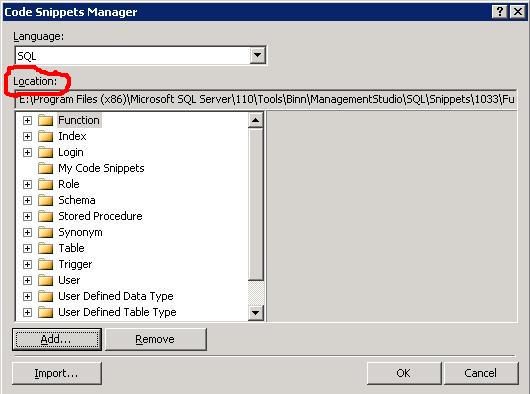
Take a note of the location of the snippets by navigating to Tools/Code Snippets Manager:


You can then find the .snippet file and make the appropriate modifications. Its just an xml file and for my needs I just needed to make the following change:

<Code Language="SQL">
            <![CDATA[
/* 
created by: 
date created:
description:
debug:

*/
CREATE PROCEDURE $SchemaName$.$storedprocname$ 
    @$Param1$ $datatype1$ = $DefValue1$,
    @$Param2$ $datatype2$ 
AS
    SELECT @$Param1$,@$Param2$ 
RETURN 0 $end$]]>
        </Code> 


When I hit the snippet function, I now get the updated template for my stored procedure. Hoepfully, this will encourage the devs to follow the standards.

Wednesday, 25 January 2012

Visual Studio: Change default browser


When debugging web apps in Visual Studio, the browser it throws up is typically your default browser. Makes sense I guess. However, once you have many browsers on your machine you may wish to change this.

This is the scenario I cam up against the other day and thanks to this article, I managed to do find a way.

Essentially, you need to right click on an ASP.NET (.aspx) page in your project, right click and select "Browse With..." and change the default browser.


NB: if you are developing an MVC with Razor, I found you had to just add an .aspx file to the project to achieve this goal then remove it.

Friday, 20 January 2012

T-SQL: Find missing gaps in data

I recently had solve a problem of finding missing values in a data series and at the same time, came across this article on the new Analytic Functions in SQL2012.

It turns out that there is a new function which can simplify my solution although as the problem is on a SQL2008 database, I won't be able to implement it. Still, another piece of the jigsaw.

Here, I'll present queries for each version:

USE TempDB
GO


-- setup the table 
CREATE TABLE [dbo].[HoleyTable](
  
[Date] [datetime] NOT NULL,
  
[Country] [char](3) NOT NULL,
  
[Val] [decimal](22, 10) NULL
)
ON [PRIMARY]
GO


 -- and some sample data
INSERT INTO dbo.HoleyTable (Date, Country, Val) VALUES ('20100131','GBP', 40) 
INSERT INTO dbo.HoleyTable (Date, Country, Val) VALUES ('20100331','GBP', 30) 
INSERT INTO dbo.HoleyTable (Date, Country, Val) VALUES ('20100531','GBP', 20)
INSERT INTO dbo.HoleyTable (Date, Country, Val) VALUES ('20101031','GBP', 50) 
INSERT INTO dbo.HoleyTable (Date, Country, Val) VALUES ('20101231','GBP', 55) 
INSERT INTO dbo.HoleyTable (Date, Country, Val) VALUES ('20100228','USD', 20)
INSERT INTO dbo.HoleyTable (Date, Country, Val) VALUES ('20100331','USD', 10)
INSERT INTO dbo.HoleyTable (Date, Country, Val) VALUES ('20100430','USD', 15) 
INSERT INTO dbo.HoleyTable (Date, Country, Val) VALUES ('20100630','USD', 25)
INSERT INTO dbo.HoleyTable (Date, Country, Val) VALUES ('20100731','USD', 55) 
INSERT INTO dbo.HoleyTable (Date, Country, Val) VALUES ('20101130','USD', 30) 
GO 

-- SQL2008
WITH RankedData 
AS
( 
SELECT *, ROW_NUMBER() OVER (PARTITION BY Country ORDER BY Date) AS rn 
FROM dbo.HoleyTable 
) 
SELECT a.Country,
  
b.Date AS StartOfGap,
  
a.Date AS EndOfGap,
  
DATEDIFF(m, b.date, a.date)-1 AS missingdatapoints 

FROM RankedData a
  
INNER JOIN RankedData b
      
ON a.rn = b.rn + 1
          
AND a.Country = b.Country 

WHERE DATEDIFF(m, b.date, a.date) > 1; 
GO

-- SQL2012
WITH PeekAtData  
AS
(
SELECT *,
      
curr = date,
      
nxt = LEAD(Date, 1, NULL) OVER (PARTITION BY Country ORDER BY date)FROM dbo.HoleyTable 

)
SELECT Country,
     
curr AS StartOfGap,
      
nxt AS EndOfGap,
  
DATEDIFF(m, curr, nxt) -1 AS MissingDatapoints 

FROM PeekAtData p
WHERE DATEDIFF(m, curr, nxt) > 1
GO


--tidy up
DROP TABLE dbo.HoleyTable
GO


And how about the all important question of performance? Well, here is a screenshot of the execution plans for the 2 queries where you can see the 2012 implementation does outperform its 2008 counterpart by a ratio of about 3:1.


Thursday, 1 December 2011

T-SQL: Audit Data Changes

I was recently asked about how to implement auditing of data changes for a database. I know SQL Server contains the Change Data Capture feature but (as is often the case with things I want!), its an Enterprise only feature meaning its out of the reach for the application in question.

As it happened, it turned out that there was already an application in-house (that I hadn't developed) which implemented its own auditing of changes based around a simple Audit table and Triggers. I'm still yet to find out who wrote it, but it certainly does the trick. The database it runs on is relatively static so I do have reservations how scalable it is but for some tables you want control over, it may be suitable.

CREATE TABLE [dbo].[Audit](
  
[AuditID] [int] IDENTITY(1,1) NOT NULL,
  
[Type] [char](1) NULL,
  
[TableName] [varchar](128) NULL,
  
[PrimaryKeyField] [varchar](1000) NULL,
  
[PrimaryKeyValue] [varchar](1000) NULL,
  
[FieldName] [varchar](128) NULL,
  
[OldValue] [varchar](1000) NULL,
  
[NewValue] [varchar](1000) NULL,
  
[UpdateDate] [datetime] NULL,
  
[UserName] [varchar](128) NULL
)
ON [PRIMARY]

GO
 

ALTER TABLE [dbo].[Audit]  
ADD  CONSTRAINT [DF_Audit_UpdateDate] DEFAULT (GETDATE()) FOR [UpdateDate]
ALTER TABLE [dbo].[Audit] 
ADD  CONSTRAINT [DF_Audit_UserName] DEFAULT (SUSER_SNAME()) FOR [UserName]
GO

CREATE TRIGGER dbo.MyTableChangeTracking
ON dbo.MyTable 
FOR INSERT, UPDATE, DELETE
AS

DECLARE
@bit INT
DECLARE
@field INT
DECLARE
@maxfield INT
DECLARE
@char INT
DECLARE
@fieldname VARCHAR(128) 

DECLARE @TableName VARCHAR(128) = 'MyTable';
DECLARE @PKCols VARCHAR(1000)
DECLARE @sql VARCHAR(2000) 
DECLARE @UserName VARCHAR(128) = SUSER_SNAME() 
DECLARE @Type CHAR(1) 
DECLARE @PKFieldSelect VARCHAR(1000)
DECLARE @PKValueSelect VARCHAR(1000)

-- Action 
IF EXISTS (SELECT TOP 1 * FROM inserted)
BEGIN
   IF
EXISTS (SELECT TOP 1 * FROM deleted)
      
SET @Type = 'U' -- update
  
ELSE
       SET
@Type = 'I' -- insert 

END
ELSE
   SET
@Type = 'D' -- delete

-- get all the changed values (need both tables for update)
 

SELECT * INTO #ins FROM inserted 
SELECT * INTO #del FROM deleted 

-- Get primary key columns for full outer join 
SELECT @PKCols = COALESCE(@PKCols + ' AND', ' ON') + ' i.' + c.COLUMN_NAME + ' = d.' + c.COLUMN_NAME 
FROM INFORMATION_SCHEMA.TABLE_CONSTRAINTS pk
  
INNER JOIN INFORMATION_SCHEMA.KEY_COLUMN_USAGE c
      
ON c.TABLE_NAME = pk.TABLE_NAME
          
AND c.CONSTRAINT_NAME = pk.CONSTRAINT_NAME 

WHERE pk.TABLE_NAME = @TableName
  
AND CONSTRAINT_TYPE = 'PRIMARY KEY' 


-- Get primary key fields select for insert 
SELECT @PKFieldSelect = COALESCE(@PKFieldSelect + '+', '') + '''' + COLUMN_NAME + '''' 
FROM INFORMATION_SCHEMA.TABLE_CONSTRAINTS pk
  
INNER JOIN INFORMATION_SCHEMA.KEY_COLUMN_USAGE c
      
ON c.TABLE_NAME = pk.TABLE_NAME
          
AND c.CONSTRAINT_NAME = pk.CONSTRAINT_NAME 

WHERE pk.TABLE_NAME = @TableName
  
AND CONSTRAINT_TYPE = 'PRIMARY KEY' 


SELECT @PKValueSelect = COALESCE(@PKValueSelect + '+', '') + 'convert(varchar(100), coalesce(i.' + COLUMN_NAME + ',d.' + COLUMN_NAME + '))'
FROM INFORMATION_SCHEMA.TABLE_CONSTRAINTS pk
  
INNER JOIN INFORMATION_SCHEMA.KEY_COLUMN_USAGE c
      
ON c.TABLE_NAME = pk.TABLE_NAME
          
AND c.CONSTRAINT_NAME = pk.CONSTRAINT_NAME 

WHERE pk.TABLE_NAME = @TableName
  
AND CONSTRAINT_TYPE = 'PRIMARY KEY' 


-- raise an error if there is no Primary Key 
IF @PKCols IS NULL 
BEGIN
   RAISERROR
('no PK on table %s', 16, -1, @TableName)
  
RETURN
END

SELECT
@field = 0,
  
@maxfield = MAX(ORDINAL_POSITION)  

FROM INFORMATION_SCHEMA.COLUMNS
WHERE TABLE_NAME = @TableName 

-- now loop through the fields to log the values from each field
WHILE @field < @maxfield 
BEGIN
   SELECT
@field = MIN(ORDINAL_POSITION)
  
FROM INFORMATION_SCHEMA.COLUMNS
  
WHERE TABLE_NAME = @TableName AND ORDINAL_POSITION > @field
  
  
SELECT @bit = (@field - 1 )% 8 + 1
  
SELECT @bit = POWER(2,@bit - 1)
  
SELECT @char = ((@field - 1) / 8) + 1
  
  
IF SUBSTRING(COLUMNS_UPDATED(),@char, 1) &amp; @bit > 0 OR @Type IN ('I','D')
  
BEGIN
       SELECT
@fieldname = COLUMN_NAME
      
FROM INFORMATION_SCHEMA.COLUMNS
      
WHERE TABLE_NAME = @TableName
          
AND ORDINAL_POSITION = @field
      
      
-- dynamically build and execute the audit insert statement
      
SELECT @sql = 'INSERT INTO dbo.Audit (Type, TableName, PrimaryKeyField, PrimaryKeyValue, FieldName, OldValue, NewValue)'
      
SELECT @sql = @sql + ' SELECT ''' + @Type + ''''
      
SELECT @sql = @sql + ',''' + @TableName + ''''
      
SELECT @sql = @sql + ',' + @PKFieldSelect
      
SELECT @sql = @sql + ',' + @PKValueSelect
      
SELECT @sql = @sql + ',''' + @fieldname + ''''
      
SELECT @sql = @sql + ',CONVERT(VARCHAR(1000),d.' + @fieldname + ')'
      
SELECT @sql = @sql + ',CONVERT(VARCHAR(1000),i.'  + @fieldname + ')'
      
SELECT @sql = @sql + ' FROM #ins i FULL OUTER JOIN #del d'
      
SELECT @sql = @sql + @PKCols
      
SELECT @sql = @sql + ' WHERE i.' + @fieldname + ' <> d.' + @fieldname
      
SELECT @sql = @sql + ' OR (i.' + @fieldname + ' IS NULL AND d.' + @fieldname + ' IS NOT NULL)'
      
SELECT @sql = @sql + ' OR (i.' + @fieldname + ' IS NOT NULL AND d.' + @fieldname + ' IS NULL)'

      
EXEC (@sql)
  
END
END

GO


Its quite a complicated trigger and took some time to get my head round but it certainly does the trick and you just need to implement this for each table you wish to track changes on. The data is readable too:


But i wasn't comfortable with the overhead of the trigger, the dynamic sql nor the fact that I hadn't written it myself! So I considered a second approach, still using triggers but this time just dumping the changed records to an audit table in XML format. This would have the advantage of a much simpler trigger even at the cost of readability of results and potentially higher storage costs.


CREATE TABLE dbo.tblAudit(
  
AuditID INT NOT NULL IDENTITY(1,1),
  
TableName VARCHAR(255),
  
DataInserted XML,
  
DataDeleted XML,
  
DateCreated DATETIME,
  
CreatedBy VARCHAR(2000)
)
 

GO 

CREATE TRIGGER dbo.MyTable_ChangeTracking 
ON dbo.MyTable 
FOR INSERT, UPDATE, DELETE
AS

SET NOCOUNT ON
-- set the tablename

DECLARE @TableName VARCHAR(255) = 'dbo.MyTable'-- grab the changed data in XML format
DECLARE @InsertXML XML = (SELECT * FROM inserted FOR XML AUTO);
DECLARE @DeleteXML XML = (SELECT * FROM deleted FOR XML AUTO);-- log it 
INSERT INTO dbo.tblAudit (TableName, DataInserted, DataDeleted, DateCreated, CreatedBy) 
SELECT @TableName, @InsertXML, @DeleteXML, GETDATE(), SUSER_SNAME()
GO

To interogate the results, you'd need to be comfortable working with XML but the simplicity of the trigger is something i really like. Hopefully, you wouldn't need to be looking at this data too often so the ease of logging is the main factor when implementing something like this. You could easily deploy this across multiple tables/servers too with a simple Powershell script.

Now, I wouldn't recommend either of this in a highly transactional database and you would want to consider whether to implement this method if the performance of your DML statements was critical and your storage quite tight. I'm going to experiment a bit with the CDC to see just what benefits it gives over a bespoke implementation (I suspect its much more lightweight) while also hoping that the feature gets downgraded to the lower editions of SQL Server.

Thursday, 3 November 2011

T-SQL: Why have NULL bit fields?

I was asked the question the other day, why SQL Server allows NULLs for the BIT datatype. What you need to bear in mind is what NULL represents - a value which is unknown - and, so there are 3 states which you need to cater for. True, False or Unknown.

As is my wont, I like to explain things with analogies and this is no different. Consider a table holding job application details for a job board website.

CREATE TABLE dbo.tblJobApplications(
  
CandidateID INT,
  
JobID INT,
  
DateApplied DATE,
  
Successful BIT)


-- Application in progress
INSERT INTO dbo.tblJobApplicationsSELECT 1, 1, GETDATE(), NULL

-- Application unsuccessful
INSERT INTO dbo.tblJobApplicationsSELECT 2, 1, GETDATE(), 0

-- Application successful
INSERT INTO dbo.tblJobApplicationsSELECT 3, 1, GETDATE(), 1


The key field to note here is of course the BIT field which indicates the success or failure of the applicaiton. Obviously, when a candidate applies to a job, the success of the application isn't known - the candidate has been accepted, nor rejected. Its only at the end of the lifecycle of the application that this field can take on a meaningful value.

Hopefully, this contrived example helps explain just when you might require a NULL bit field.

Tuesday, 4 October 2011

T-SQL: Helping the optimiser can hinder

I've been meaning to blog about this for a while and noticing the (earlier than usual) T-SQL Tuesday #23 hosted by Stuart Ainsworth (blog | twitter) on the topic of Joins, I thought i'd cobble something together.

Essentially, this post is about reading the results of SHOWPLAN_TEXT, being aware of the different physical join operators and also how the optimiser can be influenced (poorly) by a bad WHERE clause.

I have the following query on a view which abstracts the 4 tables joined:
 
SELECT *, CAST(Val AS NUMERIC(22,16)) FROM DDL.vwData

The tables behind the view aren't really that important, as I just want to concentrate on the plans generated but basically, there is a lookup table for RateID and then a maindata table which joins to this table (via other intermediate tables). The key thing to note in the query though is the CAST - sometimes the column Val (from maindata) has a value which can't be converted - indeed running this query as is gives the error:

Msg 8115, Level 16, State 8, Line 2
Arithmetic overflow error converting numeric to data type numeric.

I know the data for RateID does have Vals which are CASTable to the decimal precision/scope and changing the query to only return those records where RateID = 1, returns a result set without errors:

SELECT *, CAST(Val AS NUMERIC(22,16)) FROM DDL.vwRateData WHERE RateId = 1

However, if I "improve" the query to filter out these records further to only return data from the last month using a non-sargable clause, i get that pesky overflow error again:

SELECT *, CAST(Val AS NUMERIC(22,16)) FROM DDL.vwRateData WHERE RateId = 1 AND DATEDIFF(D,GETDATE(),[Date])< 365

So whats different? First glance suggests something is wrong because if the whole dataset for RateId=1 returns without error, then choosing a further subset of this data should also work.

I delved into the query plans to find out and the clue was there:

The Good query generated a plan that was using a Nested Loops inner join. In a nutshell, the first thing this query does is filter out the correct rows from the lookup table (RateID = 1) and then iterates through the main table where there is a match on that RateId. In other words, it doesn't matter whether or not the Val column for other RateIDs is CASTable as this plan only touches RateID = 1.


On the other hand, the Bad query generated a plan that was using a Hash Match join. This differs in that it will read all the rows in both the tables, and thus attempting to run the CAST function over every record. Only later in the query plan does it do the filtering on the RateID.


The different types of  JOINs (both logical and physical) are explained really well in this article but the "takeaway" from this post is that you need to be careful with your query construction as the optimiser may choose a plan that can influence both performance and even robustness. Logic may tell you that adding extra filtering criteria will help the optimiser choose a more efficient plan, but in this example it has chosen a plan that has caused the query to fail.

Friday, 23 September 2011

T-SQL: A Week Of Continuous Integration Day 5

This is the final post of a 5 part series outlining my journey to getting SQL Server databases under source control and into a continuous integration environment.

The other posts are:
Day 1 - Powershell & Scripting Objects
Day 2 - Making Use of a Build Server
Day 3 - Database Developer Toolkits
Day 4 - Adding Value to Continuous Integration

Putting it all together

My journey is at an end and I finally have a working solution which has the following components:

1) A SQL Server dedicated to Continuous Integration
2) A build server/agent with Team City & Final Builder
3) Red-Gate Developer Toolbelt installed on the build agent and the developer machine
4) SVN as my version control choice and databases under Red-Gate source control
5) Tests written with the NUnit framework

Below I have outlined the full process with a few supporting screenshots to help show how things work. This isn't intended as an explanation of all the technologies used, but merely how I have bolted the pieces together to serve my purpose. Further reading can be found by visiting the wesbites of the software vendors.

SQL Under Source Control
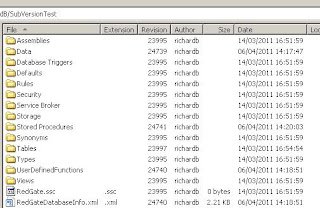


Here we have the database SubversionTest under source control using RedGates SQL Source Control. Nothing too surprising there, just a set of directories with scripts.


With the database linked to SVN, adding the object dbo.NewTable to the database gives a visual aid to let you know changes need to be commited.


On browsing to the SQL Source Control tab, you get to view the DDL for the new object and, if the object has changed, the DDL that exists within SVN.


Here is the generic FinalBuilder script I use to deploy the database to the continuous integration server. Its very simple and just drops the database if it exists, creates a new one and then uses the red-gate compare tools to deploy the database objects. I've wrapped these up in a batch file for maintenance but they don't do anything clever and they just use a combination of the switches which the sqlcompare.exe's support.


When a "build" is run, it also runs some tests. Again, I won't delve into exactly which tests are being run but this just demonstrates the sort of screen you may see subsequent to the deploy of your database. Of course, these tests are run against the Continuous Integration server and are written using the NUnit framework - something which TeamCity supports. In this instance we only have a couple of quick tests to sanity check the two objects but on more complex apps these could take a significant amount of time.


Finally, we have the artifacts generated by the process in the form of some sql scripts which will bring a production server (which the sqlcompare has run against) to the latest build we have in source control. There is also a supporting HTML file which is just a graphical representation of the changes that will be made by executing the sql script.

To ensure that the development is as bug free as possible, I've hooked the CI to occur whenever a database change is commited to SVN. This will give you confidence that the changes made have not caused any issues and at the very least haven't lead to an invalid database build. It may be that you are able to run a full run of an application which may not be suitable for "on check-in" so its possible to schedule some builds/tests to run during quiet time.

Taking it even further

If you ship a database enabled product, one of the real benefits of a solution such as this is that you can quickly and easily target different versions/editions of SQL Server. It may be that a client runs a particular hotfix of SQL Server and wants to know whether this can be supported. If you can quickly provision an instance with to mimic that of a client, you can easily point your TeamCity projects at the new instance and see if your database builds and runs successfully.

I've talked before about using extended properties to version your database objects and you can use this automated process to help that. SVN has built in revision numbers to when docs get checked in so you could easily set up a build step within teamcity to run a T-SQL script to update extended properties with this number. I haven't done this but will definitely be experimenting with it.

The final word

Hvaing worked with databases out of source control for sometime, I'm really excited about how this is going to improve the quality of our database development going forward. The tools that Red-Gate have provided are easy to use and the simplicity of them is whats so impressive. I have hardly had to change my working practices at all and know that i'm already in a better place. Time will tell whether the versioning and targeting of different database editions takes off but I know that its not going to be a big challenge to implement.

I hope this has been useful to you and would be interested in hearing from people who may have implemented similar solutions or have any ideas on how to make this even better.

References

Red Gate SQL Source Control
Red Gate SQL Toolbelt
FinalBuilder
Team City
Microsoft Visual Studio
Microsoft SQL Server
Powershell
NUnit


Thursday, 22 September 2011

T-SQL: A Week Of Continuous Integration Day 4

This is the fourth post of a 5 part series outlining my journey to getting SQL Server databases under source control and into a continuous integration environment.

The other posts are:
Day 1 - Powershell & Scripting Objects
Day 2 - Making Use of a Build Server
Day 3 - Database Developer Toolkits


Adding Value to Continuous Integration

As i've mentioned previously, regular deployments of a database from source control has benefits such as validating source code in a similar way to the Build feature in Visual Studio. But this really is just the tip of the iceberg. We are now able to use this as the foundation to add extra building blocks which will add real value to our database solutions. Below is a summary of the 3 features that I'm gaining from including my database applications into continuous integration.

Unit/Integration Testing

The subject of unit testing for databases comes up frequently and although this post won't delve into this, I will touch on a couple of points. Essentially, meaningful unit testing is an area that is notoriously difficult to implement in SQL Server mainly due to the dependency on data. Visual Studio offers a database unit testing framework which makes it easier to develop the tests but you are still using c# code to execute T-SQL commands. It isn't a native T-SQL framework. However in my opinion, pure unit testing isn't a must have and as long as there are a suite of tests being executed then i'm happy. It may even be possible to run a full end to end solution of your database application. The point is that you are able to execute regular tests against your Continuous Integration server and significantly improve the confidence in your code and hopefully minimise the level of bugs that reach production.

I ended up writing a few "pseudo" unit tests using the NUnit Framework. Unfortunately, it appears that database unit test framework available with Visual Studio 2008 is not avaiable without installing the full version/IDE making it unsuitable for deploying to multiple build agents (although i'm told this is addressed in VS2010). The tests each had a setup script which would deploy a set of known test data to the database which would allow my tests to run.

I'm no expert in writing valuable unit tests, but to give you an idea of what it MIGHT look like, here is my example:

[TestFixture]
public class DBTests
{
[Test]
public void FormatDateIsNotNull()
{
var dt
= DateTime.Now;
string str = null;

using (var sqlConnection = new SqlConnection("Data Source=CISERVER;Initial Catalog=CIDATABASE;Integrated Security=SSPI;"))
{

SqlCommand cmd
= new SqlCommand();
cmd.CommandText = "SELECT dbo.FormatDate('20101231')";
cmd.Connection = sqlConnection;
sqlConnection.Open();

str = cmd.ExecuteScalar().ToString();
}

Assert.IsNotNull
(str);
}
}


Change/Deploy scripts

From a production and release perspective, there is huge value in automating the generation of scripts for release. In the past, constructing a release script manually has been massively time consuming and more importantly, prone to error. Similarly, there is a need for the person who is charged with creating the release/change script to have strong SQL development skills.

Using a development product such as Visual Studio/Red-Gate Compare, the hassle is taken out and you can compare your SVN repository with a production environment and generate the required script to sync them. You could take it a step further and automatically deploy the changes but this is something i'd be reluctant to do as there may be a whole set of steps post Continous Integration that need to be completed before go-live. But still, the very fact that the script has been automatically generated means that a relatively unskilled person can take them and deploy the changes. Along with the data and schema diff capabilities, the Red-Gate tools also provide a nice diff report which can allow users to review the changes without having to understand and interpret a potentially huge file of SQL code.

Database Versioning

A nice feature you can also harness with this process is to automatically manage some form of database build version. As your database develops and new features of the application are supported, its helpful to know which version of the database objects are being used. It'd be nice if MS had an inbuilt function which stamp a database or object with a version, but as they don't you can implement this with either a simple version table or by the use of extended properties. To what level you take the versioning is a personal choice, but I've chosen to have a Major/Revision stamp where the Major version is manually changed in the table and the Revision version is taken from the internal value that comes out of SVN. The beauty of having your database in a CI envrionment is that this number is automatically maintained so as you check changes into source control, the number is incremented and the database version can be updated removing the reliance on someone remembering to update it.

Targeted Database Version Testing

One final benefit of having a slick continuous integration environment configured is that you can easily point your builds to target a different server. This allows you to quickly prove that your database application supports different editions and versions of SQL Server. For example, a client may be running a particular Service Pack or you are considering upgrading your production kit to Denali. Having a standard and reliable build process will give you peace of mind that your database deploys without error and functions correctly on any given environment. As the pace of change increases and hotfixes, service packs and versions are released more frequently, so your test matrix expands and so the ability to quickly test your solution is invaluable.

Wednesday, 21 September 2011

T-SQL: A Week Of Continuous Integration Day 3

This is the third post of a 5 part series outlining my journey to getting SQL Server databases under source control and into a continuous integration environment.

The other posts are:
Day 1 - Powershell & Scripting Objects
Day 2 - Making Use of a Build Server

Database Developer Toolkits

Although the path to Continuous Integration had taking a knock back with the limitations of my powershell solution, i was determined to succeed. Initially, i'd wanted to cobble something together on a shoestring harnessing existing technologies to make the solution portable and cheap. However as time went by, the importance and benefits of CI became clearer and clearer and I felt it was time to look into other products (both 3rd party and MS) to see if there was a solution out there for us. After all, this can't be anything new and there's no need to reinvent the wheel.

There were 2 main issues that I wanted any solution to address:

1) keeing our source control up to date easily
2) deploying database solutions to a Continuous Integration server

Based upon this, I quickly found 2 potential avenues to explore.

1) Visual Studio Database Edition
2) Red-Gate Developer Toolbelt

Visual Studio Database Edition 2008

I was fortunate in that I was already in possession of a licensed copy of Visual Studio and indeed, a few of the guys had used the database projects (dbproj) for SQL development. It also has diff capabilities for both schema and data which would allow you to generate a deployment script. Fundamentally though, I believe that database development should be done in SQL Server Management Studio (SSMS) and i've outlined a few of the differences I see between the two as a database development IDE.

SQL Server Management Studio (SSMS)


  • more natual for a Database Developer
  • Can develop "online" against a database
  • immediate feedback from intellisense
  • easy to view dependencies in sql
  • edit multiple databases in one session
  • edit multiple objects in one connection
  • no native support for source control
  • Free

    Visual Studio 2008 Database Edition
  • version dependencies - tied to a particular version
  • have to develop against scripts and apply them
  • solutions allow grouping of all dev project types (c#, ssrs, ssas, ssis, dbproj etc)
  • builds fail if there are dependencies on other dbs
  • doesn't support shared development model
  • can manually deploy to different servers
  • integrates into source control (with plugins for some vendors)

    Visual Studio Database Edition is a good product in its own right and really does check a lot of the boxes for me with development. Being able to bundle all your projects as one solution is really nice and the diff capability is something that I believe MS really should incorperate into SSMS. However, from a continuous integration perspective, the use of VS just doesn't work for me. Besides the cost and heavyweight install requirements for running it on a build server (i don't think there is a simple SDK which works), the major show stopper for me is the disconnecting nature of development with SQL objects. Working with individual scripts and then applying the changes manually just isn't a viable solution for me. A database professionals natural habitat is SSMS and unless MS make database projects available through this IDE then it will the case for using Visual Studio Database Edition will always struggle to stack up.

    Red-Gate SQL Developer Toolbelt

    The red-gate solution is based upon their SQL Developer Toolbelt and it solves both the issues highlighted above. The first componenent is the SQL Source Control product which is essentially a plug-in to SQL Server Management Studio and allows you to manage your source control from the same environment you are developing in. You can essentially make changes to objects from within SSMS and you can then right click the object and commit them. Simple but effective, it even has colours to suggest when a change needs to be sync'd to the repository while it supports both the shared and dedicated development models. With my belief that development should happen in SSMS, this is a huge tick in the box as you don't have to jump through any hoops to keep your database in sync with source control.

    SQL Source Control scripts out the database to file (including data!) in an intuitive folder structure which leads nicely into generating a build script to deploy to a continuous integration server. Red-Gate offer a "Compare" tool which allows "diff"ing of databases as well as generating change scripts and deploying a database from source control. Importantly, all this functionality is available from the command prompt and could therefore be scheduled on a buildserver. The ability to easily generate a build script and execute was the key ingrediant missing from the Powershell solution and essentially leaves us with a solution which answers all the questions (and a few more besides!) and is an intuitive end-to-end development process which fits nicely into my way of working.

    We are now in a position to:
    1) Database Objects Scripted and maintained in realtime
    2) Scripts stored in Source Control
    3) A database server provisioned for continuous integration
    4) A build server which could execute the steps.
    5) Software which can deploy the database from source control.
  • /* add this crazy stuff in so i can use syntax highlighter