Showing posts with label SQL Developer Tools. Show all posts

Thursday, 26 July 2012

SSMS: Help prevent the "oh ****" moment

Its funny how sometimes you think of something which would be great idea and then the solution falls into your lap. This very thing happened to me the other day after an "oh ****" moment when I executed a query on a production server rather than the test server. Unfortunately, there weren't any fail safes in place (eg restricted privileges) so the query ran successfully and promptly updated a stack of live data. Fortunately, the database in question was not being used and so there was no impact on users but this could so easily have not been the case.

I'm sure I haven't been the only one bitten by this, and it occurred to me that this is far too easy to do. When in fire-fighting mode it can often be the case that I'm flicking between windows with many connection windows open at one time and even the most diligent person can get caught out running a query on the wrong database. When its just a SELECT statement or you issue a query that is in the wrong database thats no big deal but if its a DML (or worse a DDL!!) statement then things can get pretty ugly quickly.

What would have been really helpful for me was an obvious indicator showing which server I was on - probably a different coloured query window (red for Prod please!!) for each database server. And then, on my daily trawl through my twitter timeline I came across this tweet:

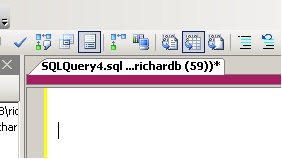
I won't go into details of all the cool tools that are mentioned in the post, but the SSMS Tools Pack has (amongst other things) functionality that replicates what I was hoping for. You can essentially configure a colour strip for a database server which is a simple visual aid to help you recognise when you in "the danger zone". 

Even better than this is the fact that you can configure a template for a New Query connection which I tweaked to try and remind the user to be aware of the colour. This means that every time I hit the New Query button the query opens with the text to remind the user to check the server with arrows pointing to the colour bar.


This obviously isn't a full proof solution and is no substitute for having more stringent measures in place to prevent issues such as issuing a delete statement on a production server in error. However, it is simple and effective and is another tool you can have in your armoury to help prevent downtime or dataloss. Every little helps!


Thursday, 2 February 2012

T-SQL: SQL2012 Code Snippets

I've never really bought into the idea of object templates in SQL Server Management Studio and in my experience, not many other database professionals have either!

Just recently however, I've been getting a increasingly frustrated at the non-standard development pattern of database objects and (just as importantly) the lack of documentation for procedures and functions. I've written in the past about using Extended Properties to help version your database and this could easily be extended to document objects too. However, in a previous role I picked up quite a nice habit of adding documentation headers to each procedure and function which gives some basic information to anyone looking at the procedure to give them a headstart in debugging/understanding. A heading may look like this:


/*
created by: Richard Brown
date created: 02/02/2012
description: this procedure just returns information about customers
debug:
   declare @custid = 1
   exec dbo.getcustomers @custid

*/


Encouraging developers to do this in practice is a real problem and this is where code snippets can come in. There are numerous default snippets available in SQL2012 management studio and you can access them by hitting CTRL-K, CTRL-X and the tabbing to the appropriate snippet:


Here you can see there are already a few default stored procedure snippets including a "create a simple stored procedure" snippet. You can create/add new snippets as you see fit but for my purposes, I want to just modify the existing snippets so they include my header as default.

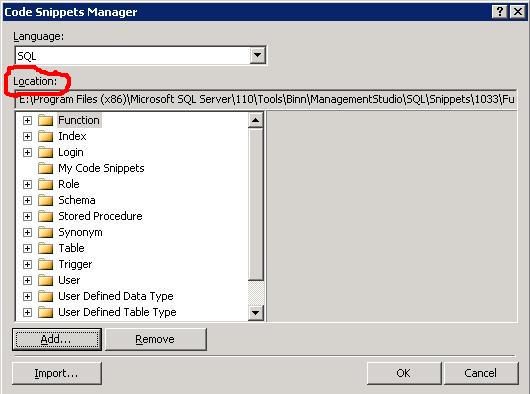
Take a note of the location of the snippets by navigating to Tools/Code Snippets Manager:


You can then find the .snippet file and make the appropriate modifications. Its just an xml file and for my needs I just needed to make the following change:

<Code Language="SQL">
            <![CDATA[
/* 
created by: 
date created:
description:
debug:

*/
CREATE PROCEDURE $SchemaName$.$storedprocname$ 
    @$Param1$ $datatype1$ = $DefValue1$,
    @$Param2$ $datatype2$ 
AS
    SELECT @$Param1$,@$Param2$ 
RETURN 0 $end$]]>
        </Code> 


When I hit the snippet function, I now get the updated template for my stored procedure. Hoepfully, this will encourage the devs to follow the standards.

Tuesday, 5 July 2011

Denali: SSMS has Improved look and feel

One of the first things I noticed with the new version of SQL Server (Denali) was the changes to Management Studio and the development experience. While not as ground breaking as the move from Query Analyzer to SSMS when SQL 2005 was released, there is definitely further movement towards a common development platform for programmers.

Here is the initial splash page you get when booting up SSMS:


The main thing I noted here was the comment in the bottom right corner which explicitly states "Powered by Visual Studio". To me, this is a clear indication of the direction MS is heading with its database toolset.

And here we have a shot of what using SSMS for development looks like:


Notice here how we have much more varied colour coding for keywords, specifically variables and object names. This is a vast improvement on the generic black text in previous versions. Another feature you can see here is the bottom left of the shot above the results pane - a zoom dropdown allowing you to quickly increase the size of the text in your query window. There is also one for the results pane, although this shot doesn't show it.

Development Environment Convergence

We've already seen Visual Studio creeping into the SQL Server arena with the Business Intelligence Development Studio (BIDS) which is essentially the VS shell with SQL Server plugged in and I can see MS trying to consolidate their development environments still further. This makes a lot of sense for software devs who will often be developing database enabled applications and need to flit between their .Net code and database code. Having a more uniform and familiar environment makes the experience that much smoother and hopefully more efficient.

Tuesday, 21 June 2011

SSMS: Intellisense Won't Let Me PARTITION BY!

Warning!

This post is really just a rant inspired from a throw away comment in this blog post.

I write a lot of CTEs (because they're great!), often in conjunction with the PATITION BY clause. I'm using SQL2008 (although the behaviour is the same in 2008R2 and Denali) and get incredibly frustrated with SSMS when writing this type of query becuase it inevitably ends up with intellisense selecting PARTITION_FRAGMENT_ID. This is because hitting space bar selects the highlighted keyword.


I haven't found a way of working around this effectively other than hitting ESC to close the dialog and then continuing. Ho hum.

Tuesday, 29 March 2011

SSMS: Beware of Modify

When you want to change the defintion of a sql programmability object in SQL2008 eg Trigger, Stored Procedure or Function using SQL Server Management Studio, you get to options when right clicking the object, Modify or Script..ALTER to.


I've never really understood the differences between the two as both appear to have the same behaviour of scripting out your object with an ALTER command. But there does appear to be a minor difference, one which i'm sure isn't by design, is only minor but definitely one to be careful of.

When using Modify to script out your object to a new window the GO separator is not included whereas it is included using the Script command. So if you happen to make a few modifications in the same window below the end of the definition of the object to test something "ad hoc", you'll need to remember to highlight only the part of the query window which forms the object. Otherwise, your testing statements will be included as part of object when you just hit F5 to persist the ALTER.

In the following screenshot, i've hit the Modify option and then written an adhoc query for a different purpose. If, I forget to remove the adhoc statement, forget to add a GO statement at the end of the procedure or don't highlight the procedure definition, this test query will be persisted as part of the procedure leading to some undesirable results.

Friday, 7 January 2011

SSIS: Can't link Tasks in Container?

I've just come across an issue whereby I have an existing For Each Loop container with a single dataflow task within. To develop the package further, I wanted to add an Execute T-SQL task within the container before the dataflow task so dragged over the task icon and configured it. However, when I tried to join the tasks with a precedence constraint, an error was thrown:

Cannot create connector. Cannot connect the executables from different containers.

This seemed a bit confusing as the tasks were definitely both within the container. However, a simple restart of Visual Studio 2008 solved the issue so this looks like a bug with the GUI.

Friday, 10 December 2010

SQL Database Project in Juneau!!

I've just watched the following video and it seems that MS are finally going to add a database project type to the default development environment.

http://www.msteched.com/2010/Europe/DAT314

Although there appear to be plenty of extra features which are impressive, just having the ability to store your database schema as a project is a massive step forward. Previously, this option was only available in Visual Studio Database Edition (aka datadude) and came at a fairly significant cost. I always thought that MS was selling DBAs/Database Developers a little short by not providing this out of the box in SSMS or BIDS but now it appears that they rectifying the situation.

It'll be interesting to see what this means for SSMS. Perhaps this will be streamlined to be more akin to the old Enterprise Manager and used as an Administration tool rather than the dev/admin hybrid that it currently exists as. Personally, although I have VS2008DE, i tend to do my development using SSMS and then really just use VS2008DE to manage the project from a source control perspective. Its certainly not ideal but SSMS is where i feel most comfortable and I think this just highlights the need for a more "joined up" approach to the SQL tool suite. Fingers crossed this is the solution.

Monday, 16 August 2010

T-SQL: Intellisense? Where's that new table?

Does this ring a bell?

You're developing in SSMS and you issue a CREATE TABLE command. You then (understandably) want to add some rows to your new table, so you pop open a new window, start typing your INSERT command and when intellisense pops up the list of tables, your new one isn't there.

No matter as you can easily refresh the cache by just hitting CTRL + SHIFT + R (or go Edit, Intellisense from the menu).

Now, the funny thing is that if you'd have just started typing your insert statements in the same window as the one where you created the table, the table would have been available in the intellisense cache. But new windows opened don't appear to reflect this - its as if each query connection keeps a list of new objects created and then adds these to the main local cache.
/* add this crazy stuff in so i can use syntax highlighter