Showing posts with label Denali. Show all posts

Wednesday, 15 February 2012

T-SQL: Get Last Day of Month

One of my early blog posts highlighted how to get the first day of the current month. Well, another common task is get to the last day of a month and i'm (reasonably) pleased to see that SQL Server 2012 has an inbuilt function to achieve this.

In versions previous to SQL2012, this problem can be solved by running the following:

DECLARE @InputDate DATE = GETDATE() 

SELECT DATEADD(D, -1, DATEADD(M,DATEDIFF(M,0,@InputDate)+1,0))


However, we can now just use the inbuilt function EOMONTH which should make coding easier to read.

DECLARE @InputDate DATE = GETDATE()

SELECT EOMONTH(@InputDate)


-- 2012-02-29 


You can also specify an offset to the function which will allow you to look at months x number of months from your inputdate which I can certainly see being useful.

DECLARE @InputDate DATE = GETDATE()

SELECT EOMONTH(@InputDate, 4)


-- 2012-06-30

Note how the return type is a DATE and not a DATETIME.  Interestingly, Books Online suggests that the return type is "start_date or datetime2(7) although my tests suggest it always returns DATE.

Friday, 20 January 2012

T-SQL: Find missing gaps in data

I recently had solve a problem of finding missing values in a data series and at the same time, came across this article on the new Analytic Functions in SQL2012.

It turns out that there is a new function which can simplify my solution although as the problem is on a SQL2008 database, I won't be able to implement it. Still, another piece of the jigsaw.

Here, I'll present queries for each version:

USE TempDB
GO


-- setup the table 
CREATE TABLE [dbo].[HoleyTable](
  
[Date] [datetime] NOT NULL,
  
[Country] [char](3) NOT NULL,
  
[Val] [decimal](22, 10) NULL
)
ON [PRIMARY]
GO


 -- and some sample data
INSERT INTO dbo.HoleyTable (Date, Country, Val) VALUES ('20100131','GBP', 40) 
INSERT INTO dbo.HoleyTable (Date, Country, Val) VALUES ('20100331','GBP', 30) 
INSERT INTO dbo.HoleyTable (Date, Country, Val) VALUES ('20100531','GBP', 20)
INSERT INTO dbo.HoleyTable (Date, Country, Val) VALUES ('20101031','GBP', 50) 
INSERT INTO dbo.HoleyTable (Date, Country, Val) VALUES ('20101231','GBP', 55) 
INSERT INTO dbo.HoleyTable (Date, Country, Val) VALUES ('20100228','USD', 20)
INSERT INTO dbo.HoleyTable (Date, Country, Val) VALUES ('20100331','USD', 10)
INSERT INTO dbo.HoleyTable (Date, Country, Val) VALUES ('20100430','USD', 15) 
INSERT INTO dbo.HoleyTable (Date, Country, Val) VALUES ('20100630','USD', 25)
INSERT INTO dbo.HoleyTable (Date, Country, Val) VALUES ('20100731','USD', 55) 
INSERT INTO dbo.HoleyTable (Date, Country, Val) VALUES ('20101130','USD', 30) 
GO 

-- SQL2008
WITH RankedData 
AS
( 
SELECT *, ROW_NUMBER() OVER (PARTITION BY Country ORDER BY Date) AS rn 
FROM dbo.HoleyTable 
) 
SELECT a.Country,
  
b.Date AS StartOfGap,
  
a.Date AS EndOfGap,
  
DATEDIFF(m, b.date, a.date)-1 AS missingdatapoints 

FROM RankedData a
  
INNER JOIN RankedData b
      
ON a.rn = b.rn + 1
          
AND a.Country = b.Country 

WHERE DATEDIFF(m, b.date, a.date) > 1; 
GO

-- SQL2012
WITH PeekAtData  
AS
(
SELECT *,
      
curr = date,
      
nxt = LEAD(Date, 1, NULL) OVER (PARTITION BY Country ORDER BY date)FROM dbo.HoleyTable 

)
SELECT Country,
     
curr AS StartOfGap,
      
nxt AS EndOfGap,
  
DATEDIFF(m, curr, nxt) -1 AS MissingDatapoints 

FROM PeekAtData p
WHERE DATEDIFF(m, curr, nxt) > 1
GO


--tidy up
DROP TABLE dbo.HoleyTable
GO


And how about the all important question of performance? Well, here is a screenshot of the execution plans for the 2 queries where you can see the 2012 implementation does outperform its 2008 counterpart by a ratio of about 3:1.


Saturday, 26 November 2011

Denali: Now gets a proper name!

Since I last blogged about Denali, Microsoft has announced the official name for this version of SQL Server to be....(drum roll). SQL2012. Ok, ok. I'm pretty underwhelmed too but hey ho. Project Crescent now has the rather grand title of Power View and Juneau has the slightly less impressive Data Tools.

More exciting and interesting though are the changes to the Editions and also the licensing costs, in particular the introduction of a BI edition and the move to per core licensing. You can read more about this in this blog from Geoff Hiten.

I also came across this blog from the SQL Express guys which talks of the new LocalDB edition aimed at Developers. A lightweight database server with less management overhead than a full SQL Express edition. Nice.


Thursday, 13 October 2011

Denali SSIS: Loop through a list of servers

Its been tough to get any time recently to play with Denali, so I thought i'd put together a quick tutorial on SSIS using Denali to give people a tiny flavour of what it looks like. I intend (time permitting) to use this tutorial in the future to extend the package to show off a few of the new features of Denali.

Note: this task can be achieved in previous versions of SSIS with minimal changes.

The aim of this package is a simple one: to iterate over a list of Servers and execute a SQL task against each one. I've also thrown in a Script task too for good measure.

Setup

First up, we'll set up the test data in Management Studio (look at that cool Denali syntax colouring!):


Then we move into Visual Studio to start our package:

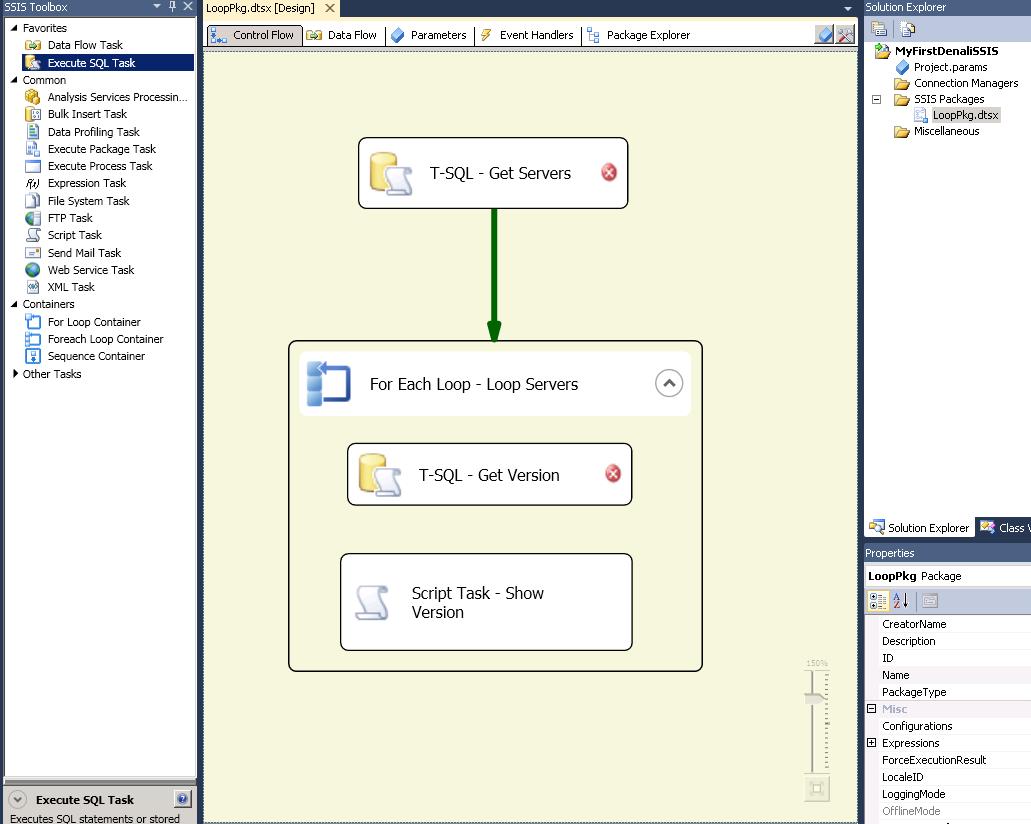
Although I've not configured the Tasks yet, you can immediately get a feel for what the purpose of this package is going to be. As you might expect, there is improved "kerb appeal" from MS in this release with smoother graphics and features such as the magnifier which allow you to make your design more readable.


Configuration

1) T-SQL - Get Servers:

The Execute T-SQL dialog box is straight forward enough to configure. The main thing to note on the General tab is that you need to set the ResultSet appropriately to Full result set.


 On the Result Set tab, you need to set your Result to a variable of type Object. If you haven't already created your variable, you can create one from this dialog box.


2) For Each Loop - Servers

We just need to choose the Foreach ADO Enumerator and select the object source variable to be that you populated in the previous task. Simple.


Click onto the Variable Mappings and here is where you'll pull out the relevant details from your object. In our case, we just need to grab the ServerName and populate a simple string variable to use in the tasks within the container. You need to map these variables by Zero based Index and we're only interested in the first column, hence Index 0.


3) T-SQL - Get Version

Another T-SQL task here, but the clever part is that we need the connection to be dynamic. In other words, for each server in our collection, we need to connect to that server and get its version.

First, we add an extra connection using the Connection Manager (Note, I also change my connection name to show that its dynamic - i've called it DynamicSQLConn)


We can make the connection dynamic by changing the ConnectionString property on each iteration of the loop. To do this, we dive into the Properties window and click on Expressions:


We just then set the ConnectionString property to something like the following:

"Data Source=" + @[User::ServerName]  + ";Initial Catalog=master;Provider=SQLNCLI11.1;Integrated Security=SSPI;Auto Translate=False;"


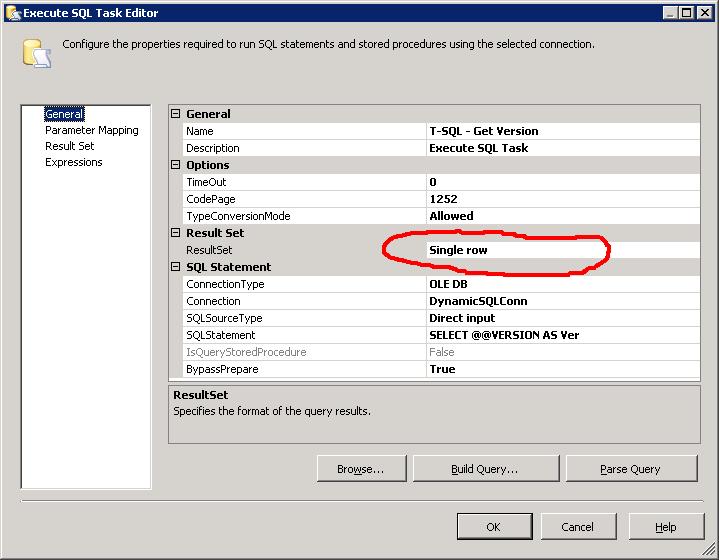
Now we can just use this connection string in our T-SQL task. I've chosen to return the results of @@VERSION. Its a single column, single row result set so i've chosen the Single Row result set.


Now we just need to configure the Result Set by sending the output to another string variable


4) Script Task - Show Version

Now typically, you'd want to do something more appropriate than just showing your results via a Message Box but this is exactly what i'm going to do. If nothing else, it illustrates the use of the Script Task.

We just open up the task and we need to pass in the variables we wish to use. You can type them in, or just use the select dialog box thats provided. As we're only displaying, they just need to be ReadOnlyVariables.


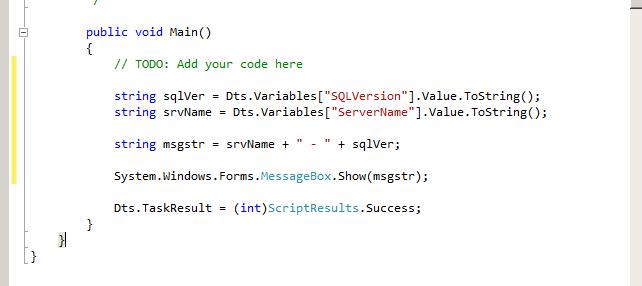
When you click Edit Script, you get a new instance of Visual Studio open up to add your code. We only need to modify the Main method:


And thats it!!

Execution

You can test and execute the package through Visual Studio and see even more of that "Kerb Appeal" that I talked about earlier. Gone are the garish colours associated with previous versions of SSIS and they've been replaced by more subtle and sexy icons:


Hopefully this has been helpful in giving a quick glance at the look and feel of Denali SSIS while also showing how you can SSIS to loop over a dataset.

Specifically the main points to take away are:
1) For Each Loop Container with an ADO Enumerator, using the Object variable and accessing properties of the object
2) T-SQL Task - using a dynamic connection with Expressions, using different Result Sets and populating variables from result sets
3) Script Task - passing in variables and writing a simple task.

Tuesday, 5 July 2011

Denali: SSMS has Improved look and feel

One of the first things I noticed with the new version of SQL Server (Denali) was the changes to Management Studio and the development experience. While not as ground breaking as the move from Query Analyzer to SSMS when SQL 2005 was released, there is definitely further movement towards a common development platform for programmers.

Here is the initial splash page you get when booting up SSMS:


The main thing I noted here was the comment in the bottom right corner which explicitly states "Powered by Visual Studio". To me, this is a clear indication of the direction MS is heading with its database toolset.

And here we have a shot of what using SSMS for development looks like:


Notice here how we have much more varied colour coding for keywords, specifically variables and object names. This is a vast improvement on the generic black text in previous versions. Another feature you can see here is the bottom left of the shot above the results pane - a zoom dropdown allowing you to quickly increase the size of the text in your query window. There is also one for the results pane, although this shot doesn't show it.

Development Environment Convergence

We've already seen Visual Studio creeping into the SQL Server arena with the Business Intelligence Development Studio (BIDS) which is essentially the VS shell with SQL Server plugged in and I can see MS trying to consolidate their development environments still further. This makes a lot of sense for software devs who will often be developing database enabled applications and need to flit between their .Net code and database code. Having a more uniform and familiar environment makes the experience that much smoother and hopefully more efficient.

Thursday, 23 June 2011

Denali: Won't Run on Windows XP

I've just come across the fact that the next version of SQL Server (Denali) will not run on Windows XP. At first, I was a little shocked but I guess it shouldn't be a surprise. After all, lest we forget that XP is now the n-2 version of Windows.

I suppose its a credit to Microsoft that Windows XP is in still in such widespread use and its quality has meant that a lot of companies are reluctant to upgrade, particularly with the issues surround Vista.

Personally though, it doesn't bother me that MS won't be supporting Denali on XP as typically I would be running the software on a Server OS such as Windows 2008/R2 athough I guess this may be different for editions such as Express.

For me, i'd be much more interested in knowing whether Denali tools were able to be installed on XP as this is often where I manage by SQL Servers.

Tuesday, 21 June 2011

SSMS: Intellisense Won't Let Me PARTITION BY!

Warning!

This post is really just a rant inspired from a throw away comment in this blog post.

I write a lot of CTEs (because they're great!), often in conjunction with the PATITION BY clause. I'm using SQL2008 (although the behaviour is the same in 2008R2 and Denali) and get incredibly frustrated with SSMS when writing this type of query becuase it inevitably ends up with intellisense selecting PARTITION_FRAGMENT_ID. This is because hitting space bar selects the highlighted keyword.


I haven't found a way of working around this effectively other than hitting ESC to close the dialog and then continuing. Ho hum.

Friday, 11 March 2011

Denali T-SQL: Sequences, eh?

A new feature introduced in SQL Server Denali is Sequences which are another method of autonumbering. These have been around in Oracle for a while and at first, I was a bit unsure as to what their benefits would be, as we already have the IDENTITY property in SQL Server.

However, after giving it a bit of thought I can see areas where this would definitely be useful and in this post, Aaron Bertrand provides evidence of performance benefits over IDENTITY.

Consider a scenario where there Items are added to a database using Service Broker. The process is as follows:
1) Items are stored with a unique INT id
2) Client adds sends Items to the Application
3) Client receives confirmation that the items will be added along with referenceIds for each item
4) Item is added to the database via Service Broker

The issue here is with step 3 as we are unable to get the next available Identity without hitting the Item table and using something such as SCOPE_IDENTITY() to get the next value. This though doesn't fit the asynchronous approach.

Using Sequences allows us to get the Ids before processing the items and return the references to the client:

-- create a sequence
CREATE SEQUENCE dbo.ItemIDs    
AS INT    
  
MINVALUE 1    
   NO MAXVALUE    
   START
WITH 1;
GO

-- and a procedure to assign ids to the items which can be returned to the client
CREATE PROCEDURE dbo.GetItemIds
@Items XML
AS

DECLARE
@TblItems TABLE (ItemID INT, Item NVARCHAR(255))

INSERT INTO @TblItems
SELECT NEXT VALUE FOR dbo.ItemIDs AS ItemID, tbl.cols.value('.', 'nvarchar(255)') AS Item
FROM @Items.nodes('//Item') AS tbl(cols)

-- i'll return this as XML and it can be passed to service broker
SELECT * FROM @TblItems
GO

DECLARE @Items XML = '<Item>Watch</Item><Item>Glasses</Item><Item>Ring</Item>'

EXEC dbo.GetItemIds @Items

GO

Ok, so it may be a contrived example but I hope it illustrates the idea. A further example may be a multipage web registration form which adds data to multiple tables and you don't actually have to commit the INSERTs until the very end. Sequences would help here too.

Friday, 14 January 2011

Denali SSIS: Execute Packages with T-SQL

Its always been a bother to me that SSIS (DTS) and the Database Engine are essentially separate products. Although they are part of the SQL Server stack, they don't really integrate (ouch!) together, illustrated by the fact they use different IDEs.

In a few roles I've had, I've needed the application to call an SSIS package from a T-SQL stored procedure and although there has been a couple of workarounds I've never been entirely satisfied with this.

At long last this appears to have been rectified and in the first CTP of the next version of SQL Server (Denali), Integration Services has been "promoted" to the Database Engine tree in Object Explorer.

But much more exciting that that is that now, there is the ability to execute SSIS packages with a T-SQL Command. Jamie Thomson has written a blog post on this exact thing so rather than me just rehash what he has done, here's the link!

Tuesday, 11 January 2011

New Year Targets 2011

Fully aware that its now the second week of January, I thought i'd make a belated attempt to jot down a few targets for 2011. I should stress, that these are purely professional related and actually, very SQL specific and I do have other things I want to achieve this year but thats for a different blog!!

There isn't anything particularly exciting about the targets themselves, but i'm conscious that I need to start protecting my GOLD time in order to achieve them.

1) Write 52 blog posts
2) Complete MCITP certification
3) Stay "current" and keep on top of DenaliCTPs
4) Continue to be an active participant in the SQL forums

So nothing too radical in there, but it will mean a bit of self discipline and some determination to keep them. Its a new year, so lets start with best intentions.
/* add this crazy stuff in so i can use syntax highlighter