Showing posts with label Management Studio. Show all posts

Thursday, 26 July 2012

SSMS: Help prevent the "oh ****" moment

Its funny how sometimes you think of something which would be great idea and then the solution falls into your lap. This very thing happened to me the other day after an "oh ****" moment when I executed a query on a production server rather than the test server. Unfortunately, there weren't any fail safes in place (eg restricted privileges) so the query ran successfully and promptly updated a stack of live data. Fortunately, the database in question was not being used and so there was no impact on users but this could so easily have not been the case.

I'm sure I haven't been the only one bitten by this, and it occurred to me that this is far too easy to do. When in fire-fighting mode it can often be the case that I'm flicking between windows with many connection windows open at one time and even the most diligent person can get caught out running a query on the wrong database. When its just a SELECT statement or you issue a query that is in the wrong database thats no big deal but if its a DML (or worse a DDL!!) statement then things can get pretty ugly quickly.

What would have been really helpful for me was an obvious indicator showing which server I was on - probably a different coloured query window (red for Prod please!!) for each database server. And then, on my daily trawl through my twitter timeline I came across this tweet:

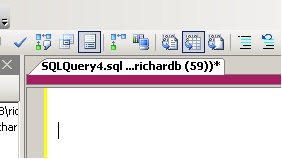
I won't go into details of all the cool tools that are mentioned in the post, but the SSMS Tools Pack has (amongst other things) functionality that replicates what I was hoping for. You can essentially configure a colour strip for a database server which is a simple visual aid to help you recognise when you in "the danger zone". 

Even better than this is the fact that you can configure a template for a New Query connection which I tweaked to try and remind the user to be aware of the colour. This means that every time I hit the New Query button the query opens with the text to remind the user to check the server with arrows pointing to the colour bar.


This obviously isn't a full proof solution and is no substitute for having more stringent measures in place to prevent issues such as issuing a delete statement on a production server in error. However, it is simple and effective and is another tool you can have in your armoury to help prevent downtime or dataloss. Every little helps!


Thursday, 2 February 2012

T-SQL: SQL2012 Code Snippets

I've never really bought into the idea of object templates in SQL Server Management Studio and in my experience, not many other database professionals have either!

Just recently however, I've been getting a increasingly frustrated at the non-standard development pattern of database objects and (just as importantly) the lack of documentation for procedures and functions. I've written in the past about using Extended Properties to help version your database and this could easily be extended to document objects too. However, in a previous role I picked up quite a nice habit of adding documentation headers to each procedure and function which gives some basic information to anyone looking at the procedure to give them a headstart in debugging/understanding. A heading may look like this:


/*
created by: Richard Brown
date created: 02/02/2012
description: this procedure just returns information about customers
debug:
   declare @custid = 1
   exec dbo.getcustomers @custid

*/


Encouraging developers to do this in practice is a real problem and this is where code snippets can come in. There are numerous default snippets available in SQL2012 management studio and you can access them by hitting CTRL-K, CTRL-X and the tabbing to the appropriate snippet:


Here you can see there are already a few default stored procedure snippets including a "create a simple stored procedure" snippet. You can create/add new snippets as you see fit but for my purposes, I want to just modify the existing snippets so they include my header as default.

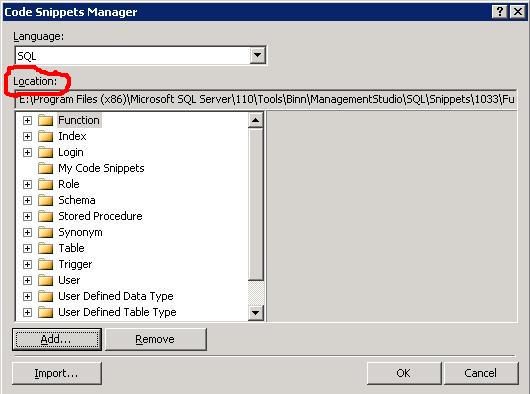
Take a note of the location of the snippets by navigating to Tools/Code Snippets Manager:


You can then find the .snippet file and make the appropriate modifications. Its just an xml file and for my needs I just needed to make the following change:

<Code Language="SQL">
            <![CDATA[
/* 
created by: 
date created:
description:
debug:

*/
CREATE PROCEDURE $SchemaName$.$storedprocname$ 
    @$Param1$ $datatype1$ = $DefValue1$,
    @$Param2$ $datatype2$ 
AS
    SELECT @$Param1$,@$Param2$ 
RETURN 0 $end$]]>
        </Code> 


When I hit the snippet function, I now get the updated template for my stored procedure. Hoepfully, this will encourage the devs to follow the standards.
/* add this crazy stuff in so i can use syntax highlighter